WhatsApp Lead Follow-Up: Templates, Timing and Automation
Leads go quiet when nobody owns the next message. Get 6 WhatsApp follow-up templates, the right timing and automation that stops when they reply.
Contents▾
- Key facts at a glance
- What is WhatsApp lead follow-up?
- Why does WhatsApp lead follow-up matter?
- How does the 24-hour window change your follow-up?
- How to follow up with leads on WhatsApp: 7 steps
- When should you send each follow-up?
- WhatsApp lead follow-up templates you can copy
- Template 1 · Instant reply
- Template 2 · 24-hour nudge
- Template 3 · Day 3 value add
- Template 4 · Day 7 final check-in
- Template 5 · After a quote
- Template 6 · Cold lead
- How do you automate WhatsApp lead follow-up?
- What are the rules and mistakes to avoid?
- How do you measure whether follow-up works?
- When does ChatDesq make sense?
- Ready to stop losing leads to silence?
- Frequently Asked Questions
- How soon should I follow up on a WhatsApp lead?
- How many follow-ups should I send?
- Do I need templates?
- Can I automate follow-up?
Many leads do not say no. They go quiet, often because nobody owns the next message. This guide shows how to follow up on WhatsApp without being pushy: how fast to reply, when to send each follow-up, what the 24-hour window allows and how to stop the sequence when a lead replies.
In this guide: 24-hour window · 3-step cadence · 6 templates · automation · metrics
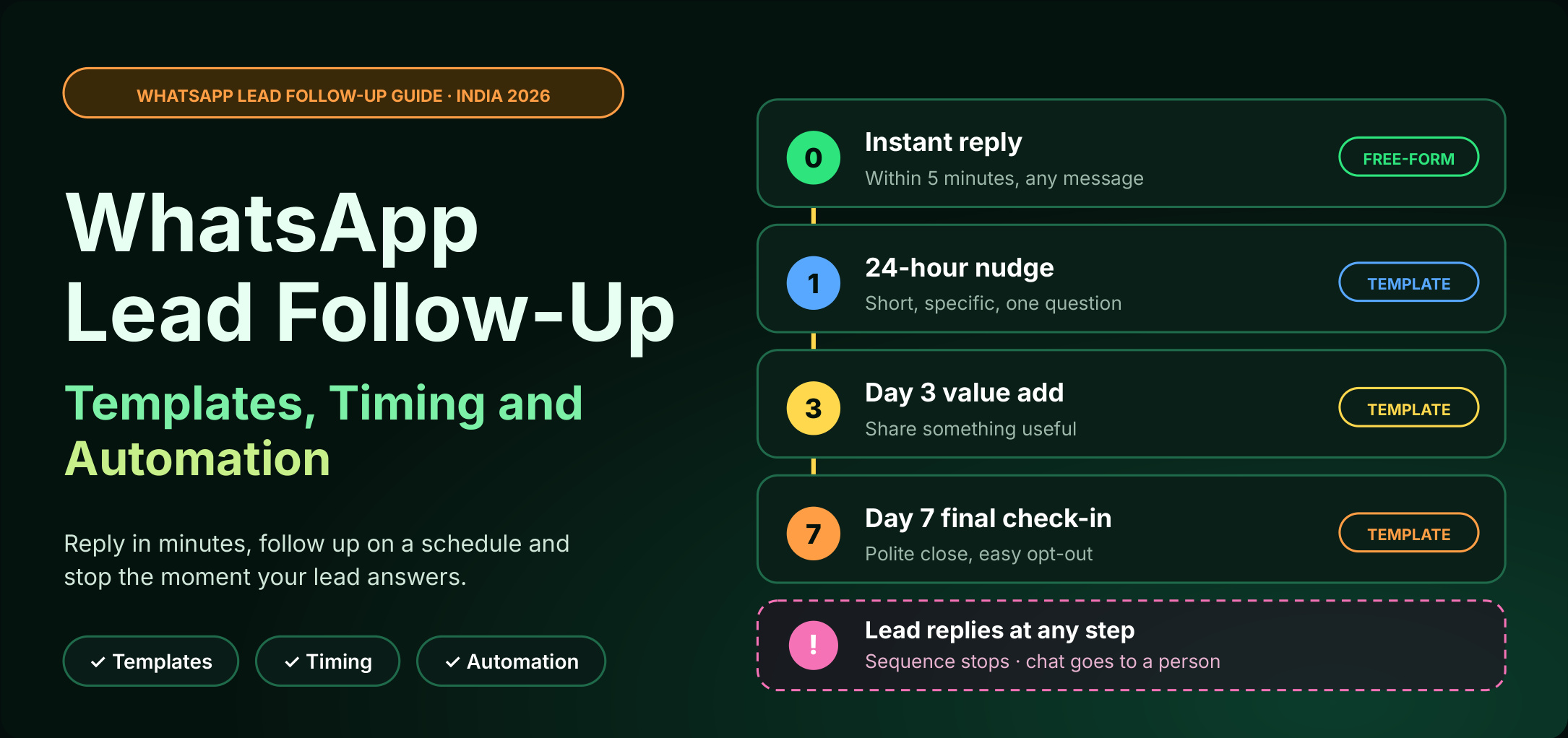
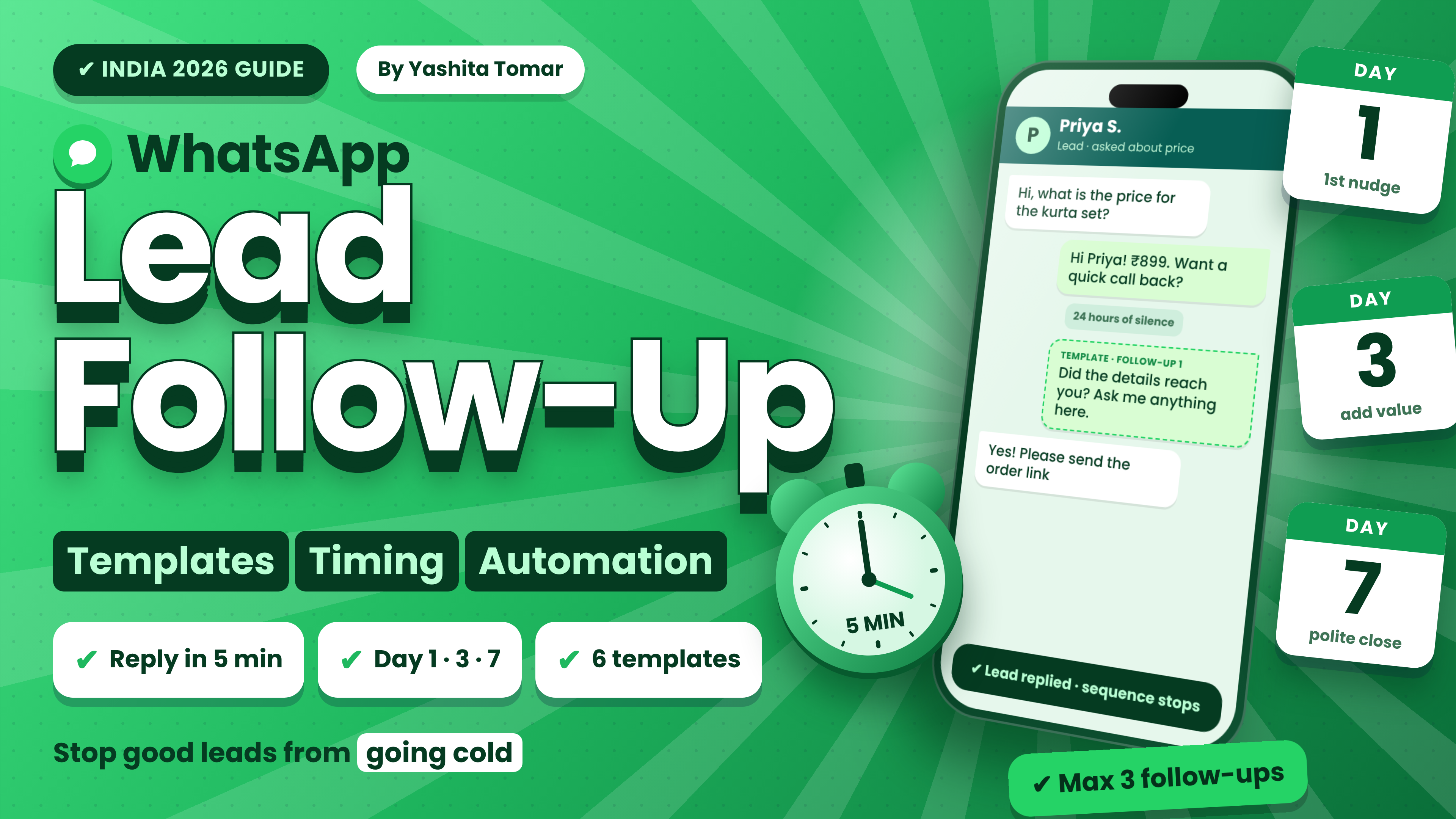
Figure 1: A follow-up sequence replies fast and stops when the lead answers.
Quick answer: WhatsApp lead follow-up means messaging a lead again after their first enquiry so interest does not go cold. Reply within minutes, follow up at 24 hours, day 3 and day 7 with approved templates, automate the sequence so it stops when the lead replies, then hand the chat to a person.
Key facts at a glance
- Best for: sales, admissions, clinic, real estate and D2C teams whose leads go quiet.
- Needs: opt-in, the WhatsApp Business API, and Meta-approved templates after 24 hours of silence.
- Golden rule: send up to three useful follow-ups, then stop.
What is WhatsApp lead follow-up?
It means sending timely, relevant messages after a lead enquires through an ad, form, QR code or chat button, especially once they go quiet. A broadcast sends one message to many people. Follow-up is a short series sent to one person, based on what they did.
Why does WhatsApp lead follow-up matter?
Speed and ownership decide most outcomes. A 2007 InsideSales.com and Oldroyd study found web leads called within 5 minutes were 21 times more likely to qualify than those called at 30 minutes. It measured phone calls, so treat it as direction, not a WhatsApp benchmark. In practice, follow-ups often fail because nobody owns the next message.
How does the 24-hour window change your follow-up?
When a lead messages you, a 24-hour window opens. After it closes, you can send only approved templates.
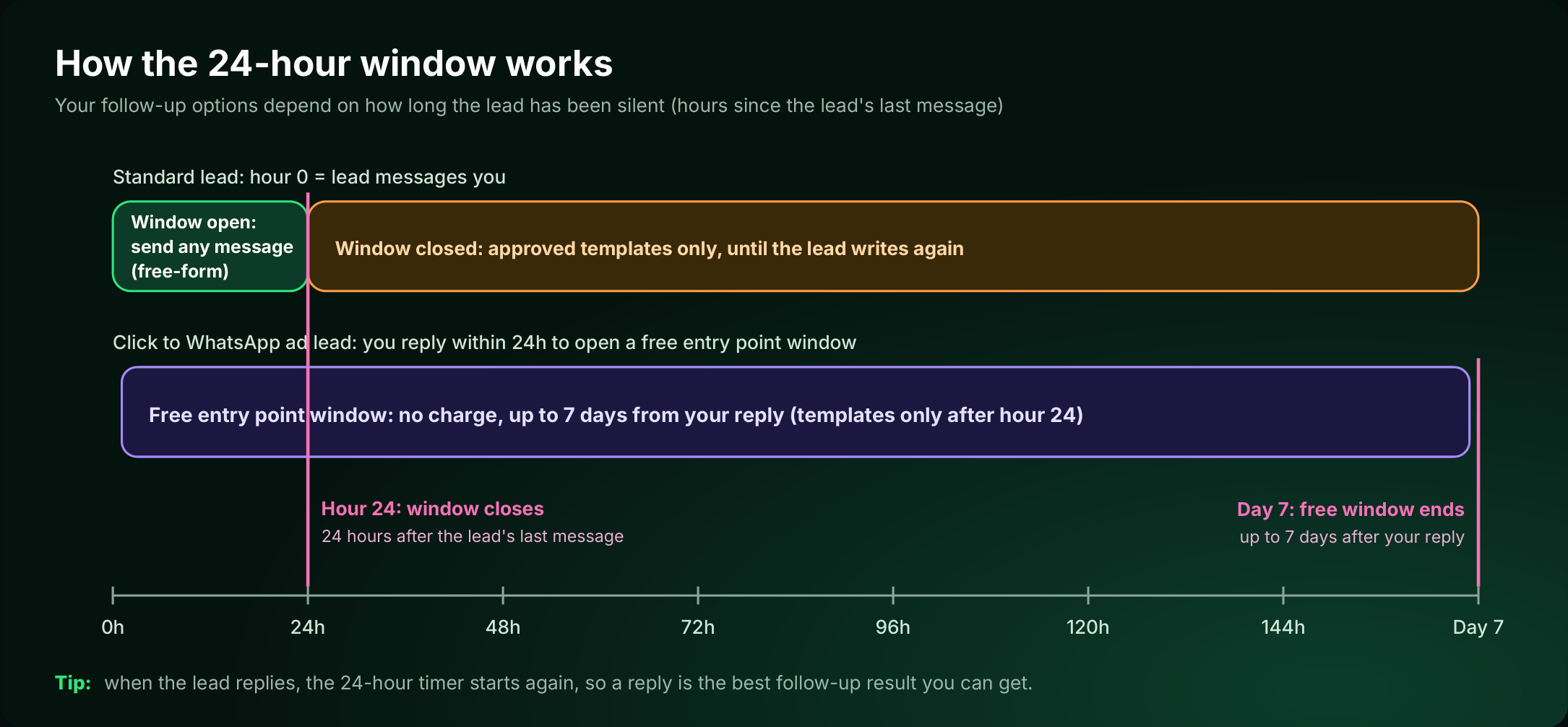
Figure 2: The window decides whether you can send free-form or need a template
| Situation | What you can send | Cost note |
|---|---|---|
| Lead wrote in the last 24 hours | Any message | Service replies: first 1,000 per number per month free, then ₹0.138 each on ChatDesq. Templates sent inside the 24 hours are charged. (Meta pricing page) |
| Silent 24 hours or more | Approved template only | Marketing templates cost ₹1.036 each on ChatDesq, excl. GST, with a ₹0 platform fee. |
| Click to WhatsApp ad lead | Any message while the 24-hour window is open; templates only after that | Free for up to 7 days after you reply (Meta pricing page) |
Cost check: three marketing follow-ups to one silent lead cost ₹3.11 on ChatDesq (3 × ₹1.036), excl. GST. Rates can change each quarter, so confirm them with your provider. Try your own numbers in the WhatsApp cost calculator.
Put these ideas into action: run this sequence with stop-on-reply automation and a shared inbox. See ChatDesq automation →
How to follow up with leads on WhatsApp: 7 steps
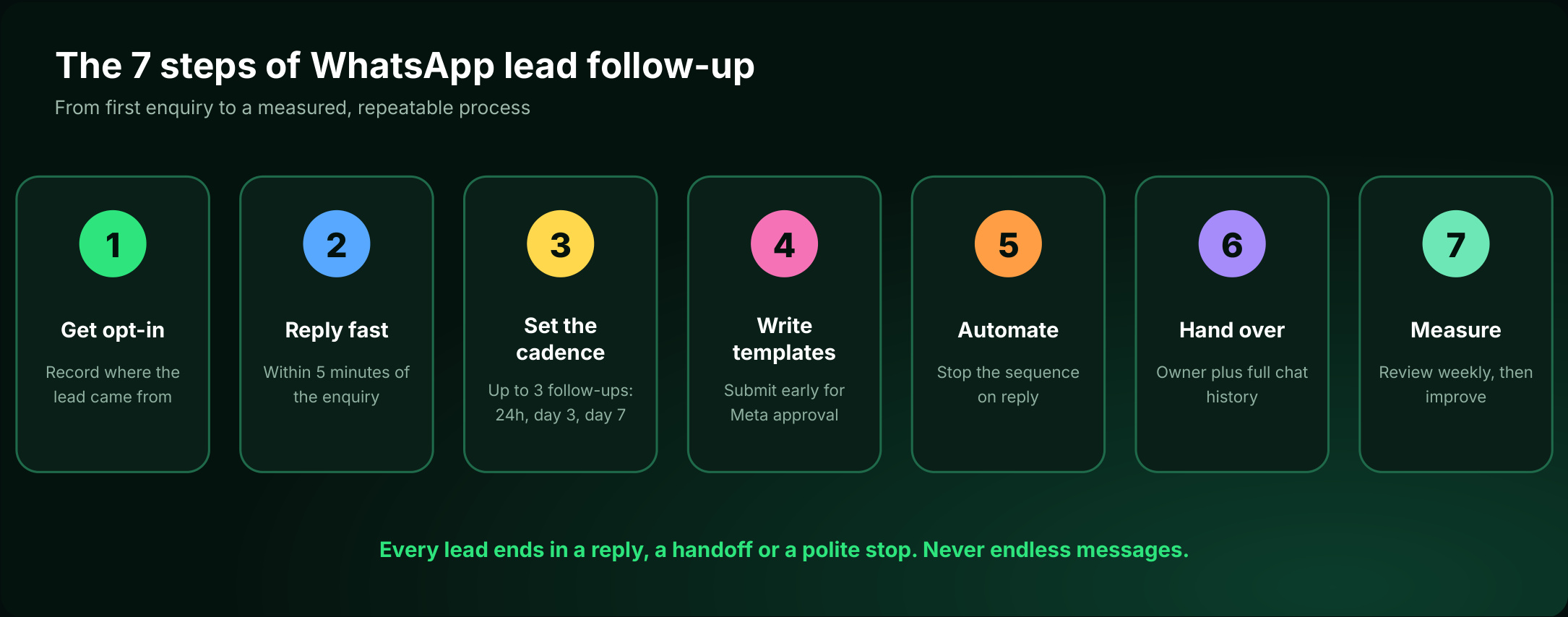
Figure 3: The seven steps of lead follow-up
- Get opt-in. Message only people who agreed, and note what they asked about.
- Reply within five minutes. Name the product they asked about.
- Cap follow-ups at three. Try 24 hours, day 3 and day 7. More can hurt delivery.
- Submit templates early. Each needs Meta approval. Use one idea, one question and an opt-out line.
- Automate and stop on reply. Use wait steps and a reply check.
- Hand over with context. Assign an owner who sees the full history.
- Measure weekly. Track replies, opt-outs and meetings booked.
Every lead ends in a reply, a handoff or a polite stop. Never endless messages.
When should you send each follow-up?
| Lead type | Follow-up 1 | Follow-up 2 | Follow-up 3 |
|---|---|---|---|
| New enquiry | 24 hours | Day 3, add value | Day 7, polite close |
| Click to WhatsApp ad | Within 24 hours | Day 2, free window | Day 7, template |
| Quote sent | 24 hours | Day 3, answer doubts | Day 7, close or pause |
| Cold lead (30+ days) | Day 1 | Day 4 | Stop, tag as cold |
WhatsApp lead follow-up templates you can copy
Replace {{1}} and {{2}} with the lead's details, and {{3}} with a short example. Template 1 is free-form and needs an open window. The rest need Meta approval.
Template 1 · Instant reply
Hi {{1}}, thanks for asking about {{2}}. Would you like a quick price range or a call back? Reply 1 for price or 2 for a call.Template 2 · 24-hour nudge
Hi {{1}}, did the details on {{2}} reach you yesterday? If one question is holding you back, ask it here. Reply STOP to opt out.Template 3 · Day 3 value add
Hi {{1}}, a quick example for {{2}}: {{3}}. Want me to show how it could work for you? Reply STOP to opt out.Template 4 · Day 7 final check-in
Hi {{1}}, I will close your enquiry about {{2}} for now. If you still want help, reply YES and I will pick it up. Reply STOP to opt out.Template 5 · After a quote
Hi {{1}}, any questions on the quote for {{2}}? Tell me what matters most and I will point you to the best fit. Reply STOP to opt out.Template 6 · Cold lead
Hi {{1}}, is {{2}} still on your list? Reply YES to continue, or NO and I will close it. Reply STOP to opt out.How do you automate WhatsApp lead follow-up?
- Trigger: a form, ad chat, CRM tag or stalled stage.
- Wait and check: wait 24 hours, then send the next template only if there was no reply.
- Handoff: on reply, stop the sequence, assign an owner and log it in your CRM.
Sample automation: a 3-step follow-up sequence. Build it once, then copy the pattern for quotes, demos and cold leads.
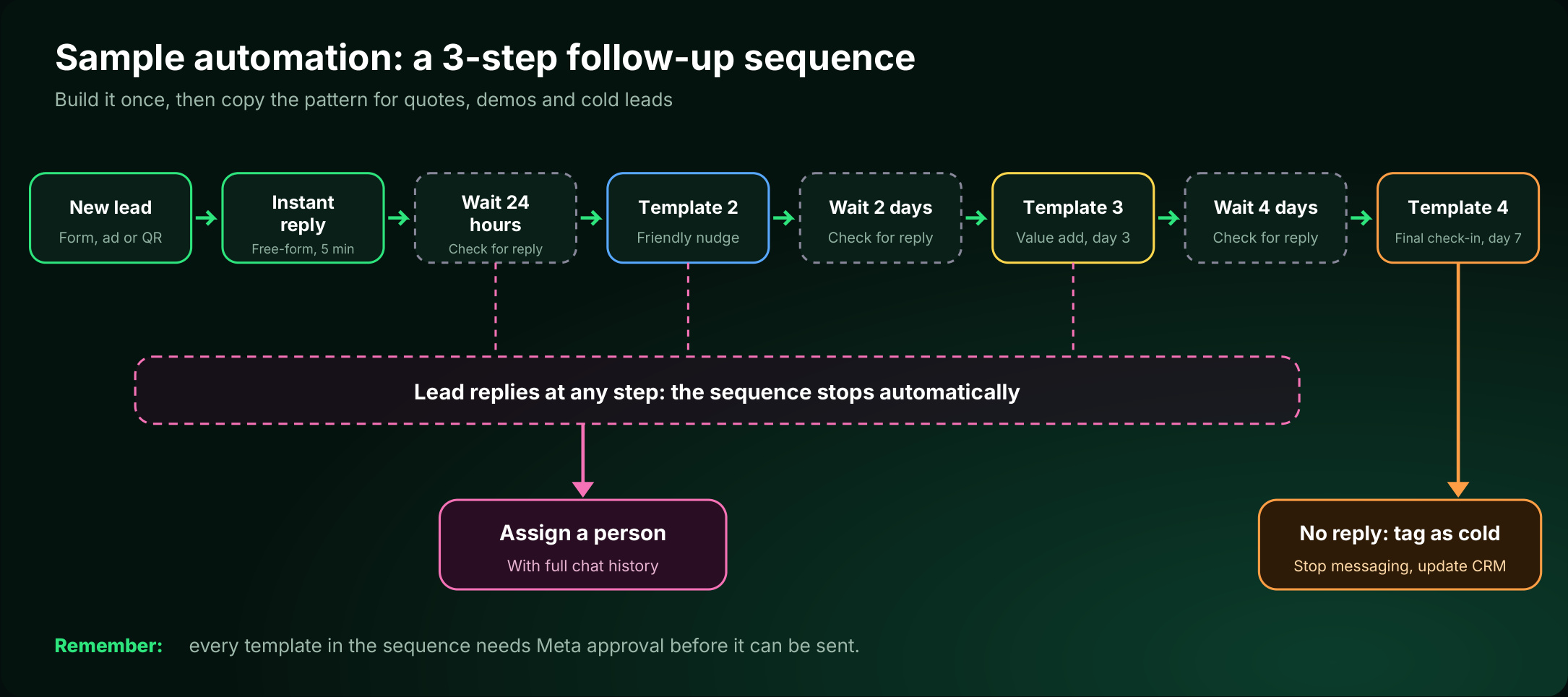
Figure 4: A sample automation to copy for quotes, demos and cold leads
- New lead (form, ad or QR).
- Instant reply (free-form, within 5 minutes).
- Wait 24 hours, check for a reply, then send Template 2 (friendly nudge).
- Wait 2 days, check for a reply, then send Template 3 (value add, day 3).
- Wait 4 days, check for a reply, then send Template 4 (final check-in, day 7).
If the lead replies at any step, the sequence stops automatically and a person takes over with the full chat history. If there is no reply, tag the lead as cold, stop messaging and update your CRM.
Remember: every template in the sequence needs Meta approval before it can be sent.
What are the rules and mistakes to avoid?
- Get opt-in. Never message bought lists.
- Use approved templates and include an opt-out.
- Never collect passwords, OTPs or card numbers in chat.
- Avoid generic phrases, repeating a message without new information, and ignoring chat history.
How do you measure whether follow-up works?
Review these weekly for the first month, then monthly. Do not judge by messages sent.
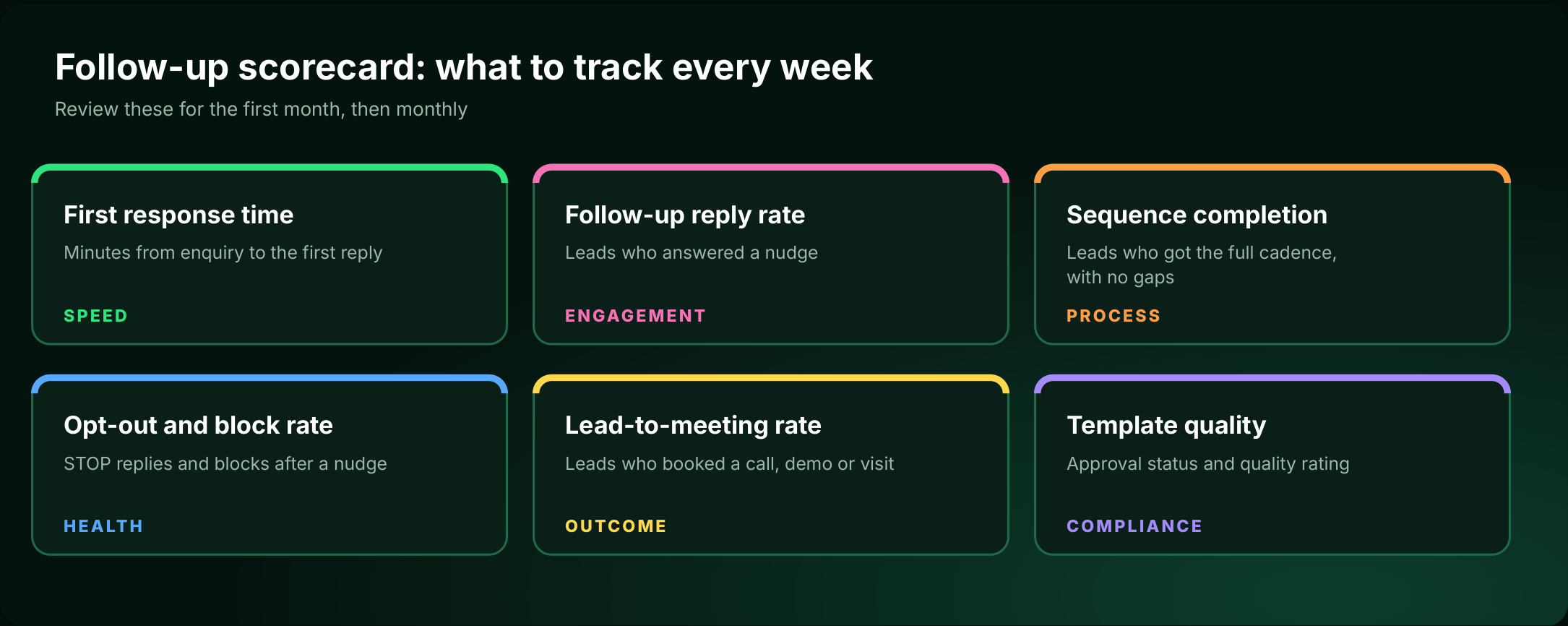
Figure 5: Six metrics to review each week
When does ChatDesq make sense?
Choose a platform with the official WhatsApp Business API, stop-on-reply wait steps, a shared inbox and customer profiles. ChatDesq combines an official API connection, a shared inbox for handoffs, no-code automations and customer profiles.
₹0 platform fee. Pay only for the messages you send.
No quarterly or yearly plan. Top up from ₹500 and stop whenever you like.
A real person replies within 2 hours, every day, 10:00-19:00 IST.
Ready to stop losing leads to silence?
Frequently Asked Questions
How soon should I follow up on a WhatsApp lead?
Reply within minutes, then send the first follow-up about 24 hours later.
How many follow-ups should I send?
Up to three. Stop when the lead replies or sends STOP.
Do I need templates?
Yes, once 24 hours have passed since the lead's last message.
Can I automate follow-up?
Yes, with the WhatsApp Business API, approved templates and a reply check.
Bottom line: reply fast, follow up a few times with something useful, and stop when the lead answers.
Rates checked 5 November 2026.
Sources: Meta pricing documentation; InsideSales.com and Oldroyd (2007 lead-response study).
Written by
Social media Marketer, Chatdesq
She writes practical guides on WhatsApp lead follow-up, WhatsApp marketing, templates and automation for Indian businesses.