WhatsApp Chatbot: How to Build One for Your Business
Akash Saxena · November 2, 2026
Last updated: 2 November 2026.
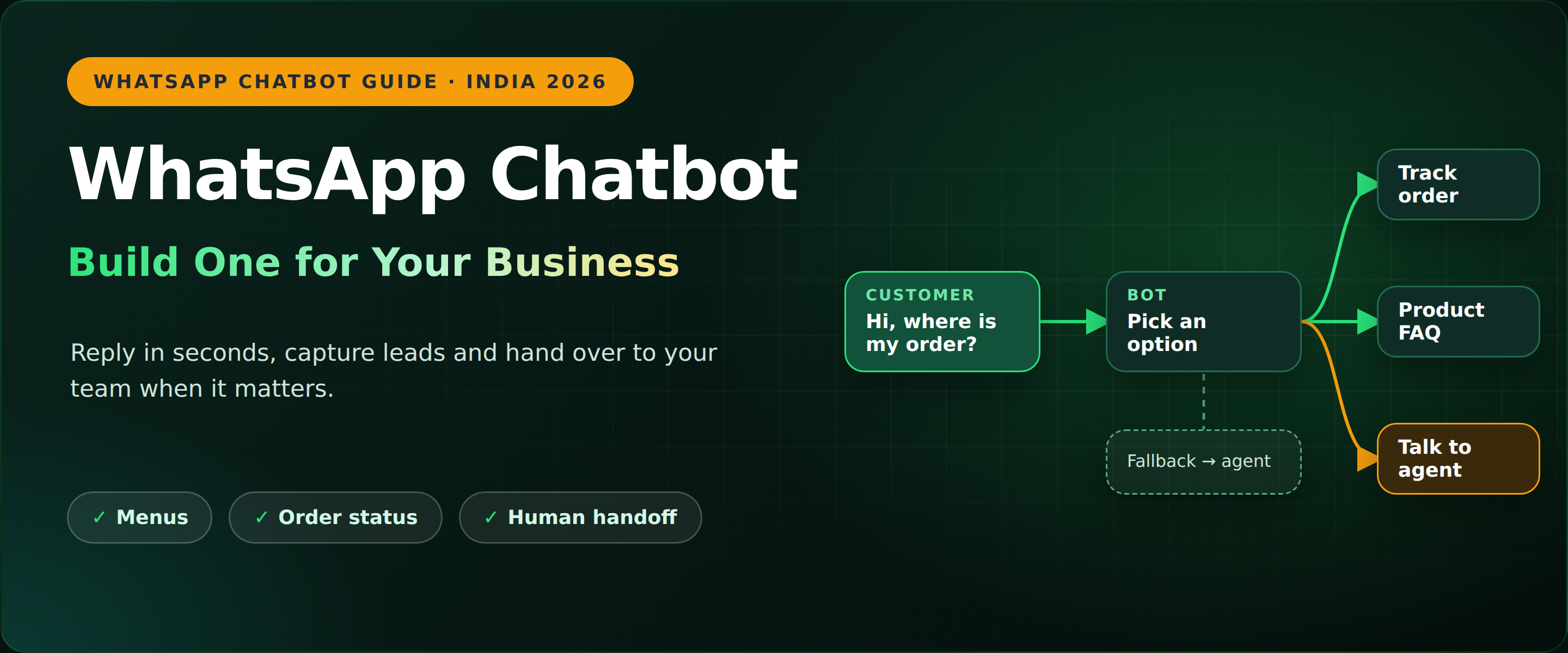
Figure 1: A WhatsApp chatbot answers, routes and hands over to your team (sample flow)
Quick answer: A WhatsApp chatbot is an automated assistant that replies to customers on WhatsApp, answers common questions, collects details and hands the chat to a person when needed. To build one, get WhatsApp Business API access through a provider, pick one job for the bot, map the conversation, build it in a no-code builder, add a human handoff and test before you launch.
Key facts at a glance
- Best for: teams that answer the same WhatsApp questions daily: D2C, retail, education, clinics and real estate.
- Two kinds: rule-based bots (menus and buttons) and AI chatbots (free text).
- Coding: none with a no-code WhatsApp chatbot builder.
- Needs: the WhatsApp Business API through a provider, a verified business and customer consent.
- Golden rule: always give customers a way to reach a human.
What is a WhatsApp chatbot?
A WhatsApp chatbot is software that chats with customers on WhatsApp for you. It greets new contacts, answers FAQs, shares order updates, qualifies leads and books appointments, then passes the chat to an agent when a question gets complex.
It is not the auto-reply in the WhatsApp Business App, which only sends a fixed greeting or away message. A chatbot holds a real back-and-forth and runs on the WhatsApp Business API, so it can connect to your store, CRM or spreadsheets.
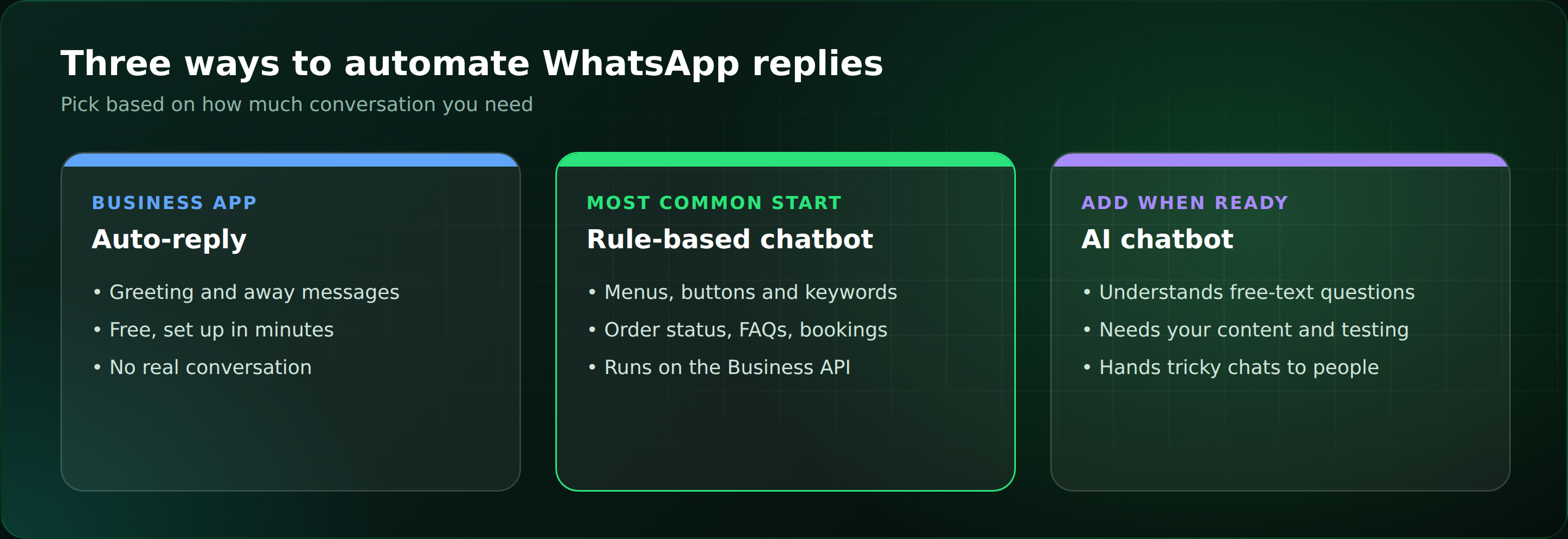
Figure 2: Three ways to automate WhatsApp replies
How does a WhatsApp chatbot work?
- The customer messages your number, from an ad, QR code or website button.
- The API passes it on to your chatbot platform.
- The bot reads it: a button tap, a keyword or, for AI bots, the meaning of the sentence.
- It replies or looks something up, such as an order status.
- A person takes over if needed, with the full chat history.
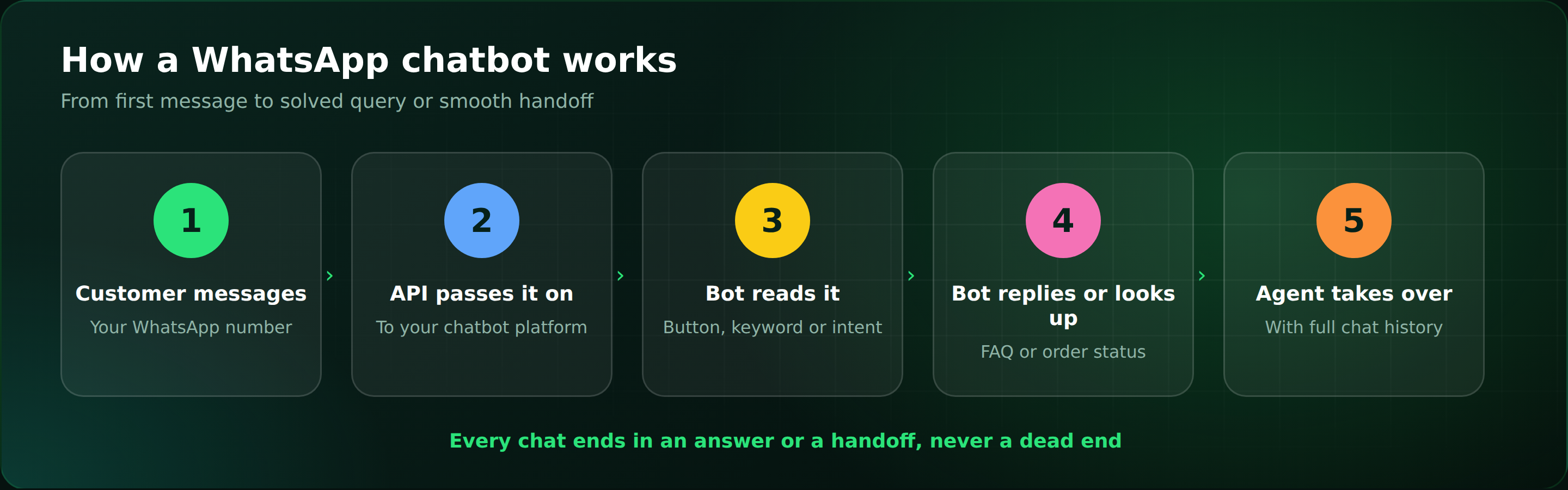
Figure 3: The five steps of a WhatsApp chatbot conversation
How to build a WhatsApp chatbot for your business: 7 steps
- Pick one job first. Start with the question you answer most: order status, pricing, lead capture or booking. One job done well beats five done badly.
- Get WhatsApp Business API access. Choose a provider, register your number and complete Meta business verification.
- Map the conversation on paper. Write the greeting, menu, answers and handoff. Keep WhatsApp chatbot buttons few: reply buttons allow up to three options and list messages up to ten (check Meta's current limits).
- Build it in a no-code builder. Drag message, question and condition blocks onto a canvas, or start from a template.
- Add a fallback and human handoff. If the bot does not understand, it rephrases once, then offers an agent. A dead end is the most common bot failure.
- Connect your tools. Use WhatsApp chatbot integration with your store, CRM or Google Sheets to look up orders and save leads.
- Test, launch small, then improve. Try real questions, including typos and Hinglish, and review chats weekly.
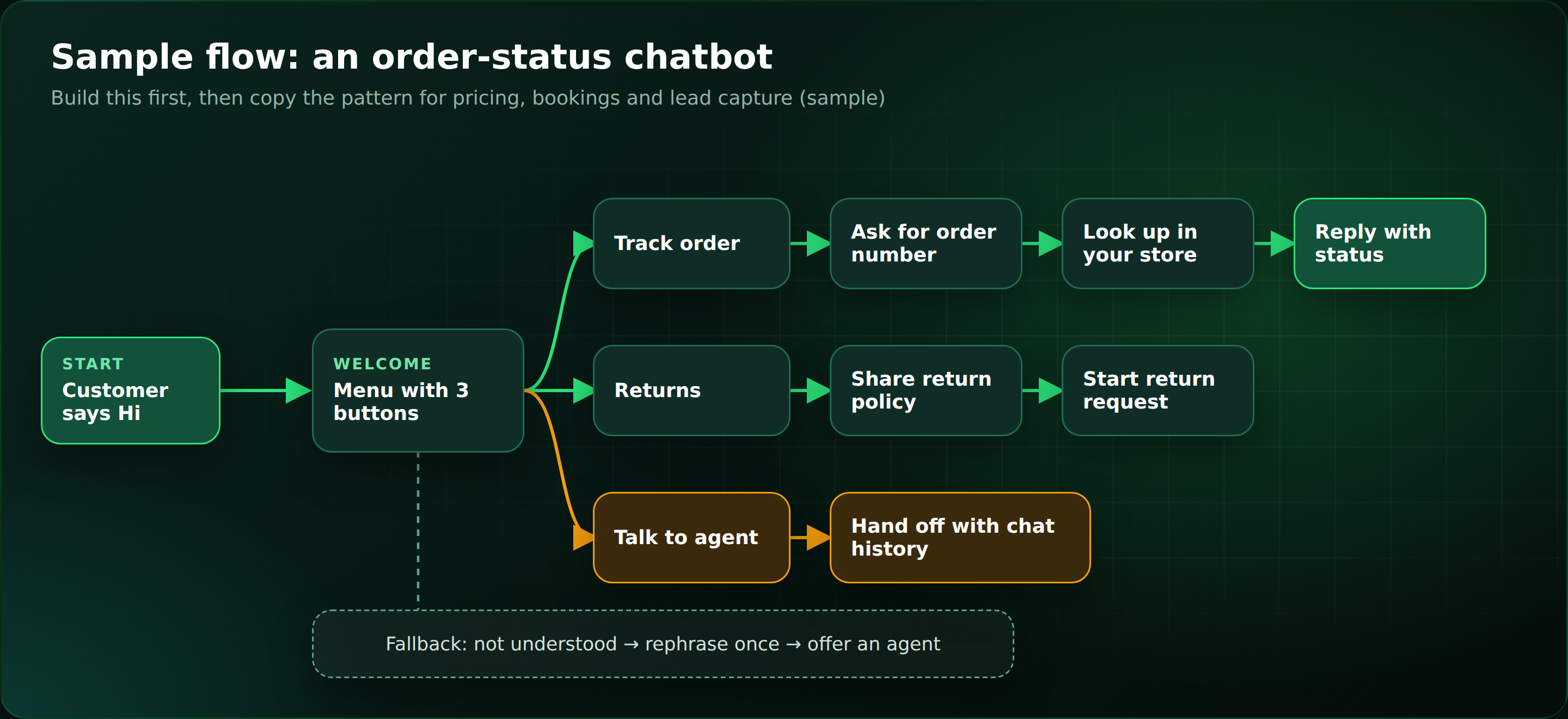
Figure 4: A sample order-status flow you can copy for pricing, bookings and lead capture
Rule-based or AI WhatsApp chatbot?
| Feature | Rule-based chatbot | AI WhatsApp chatbot |
|---|---|---|
| How it answers | Fixed menus, buttons and keywords | Understands free text and context |
| Best for | Order status, FAQs, bookings | Varied, long-tail questions |
| Setup effort | Quick, but you write every path | More setup: your content and testing |
| Main risk | Dead ends on unexpected input | Wrong answers if not based on your content |
Most businesses start rule-based and add AI once the basics work, always with a handoff.
What can a WhatsApp chatbot do for your business?
| Industry | Chatbot job | What to track |
|---|---|---|
| D2C and retail | Order status, returns, reorder reminders | Fewer where-is-my-order chats |
| Education | Course enquiries, demo booking | Leads captured |
| Clinics and salons | Appointment booking and reminders | Missed appointments |
| Real estate | Qualify enquiries, book site visits | Qualified leads |
What are the rules for a WhatsApp chatbot?
- Get opt-in. Message first only people who agreed. Never message bought lists.
- Use approved templates. Business-started chats need Meta-approved templates. Free-form replies are allowed within 24 hours of a customer message.
- Say it is a bot and write like a person: short sentences, one question at a time.
- Protect data. Never collect passwords, OTPs or full card numbers in chat.
Common mistakes: skipping the fallback, launching without tests, promising the bot can do everything, and leaving answers stale when prices change.
How do you measure whether your chatbot works?
Review these numbers weekly for the first month. Do not judge by chats handled alone, because a bot that answers wrongly is worse than none.
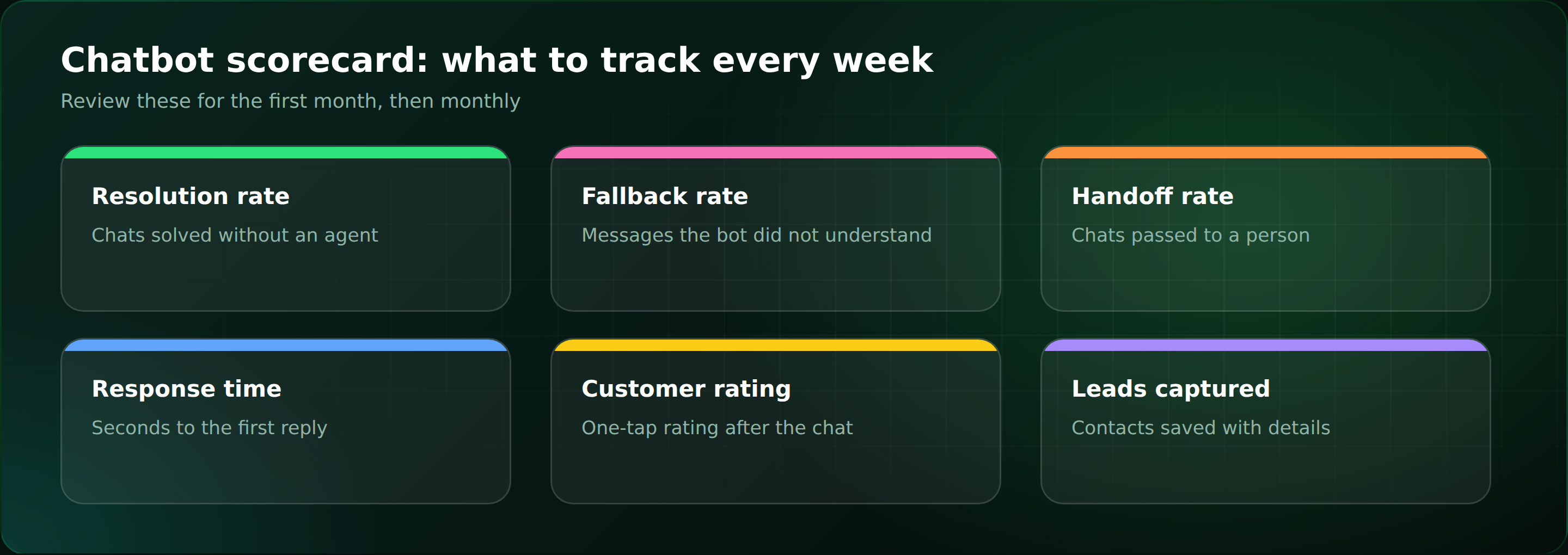
Figure 5: Six chatbot metrics to review each week
How do you choose the best WhatsApp chatbot platform?
- Official WhatsApp Business API access, not workarounds that risk your number.
- No-code builder with ready templates.
- Shared inbox and handoff, so agents see the full history.
- Integrations and analytics for your store, CRM, fallback rate and ratings.
- Clear pricing in ₹. Meta bills per delivered template message, and the platform adds its own fee plus GST.
When does ChatDesq make sense?
If several people answer the same chats, or leads wait too long for a reply, it is time for a WhatsApp chatbot. ChatDesq combines an official WhatsApp Business API connection, a shared inbox for handoffs, no-code automations and a built-in CRM.
Frequently Asked Questions
How do I build a WhatsApp chatbot?
Get API access, map one flow, build it in a no-code builder, add handoff and test.
Do I need to know coding?
No. A no-code builder uses drag-and-drop blocks.
Is a WhatsApp chatbot free?
Not fully. Providers charge a platform fee and Meta bills per template message.
Can a chatbot send promotions?
Yes, only to customers who opted in, using approved templates.
Bottom line: a WhatsApp chatbot works best when it does one job well and hands over fast. Start with order status or FAQs, add a fallback, test with real questions, then grow. See how ChatDesq can help.
Note: Confirm current WhatsApp message limits in Meta's documentation before launch. Figures are sample flows for illustration.