WhatsApp for Ecommerce: 12 Ways to Grow an Online Store
Learn 12 practical ways to use WhatsApp to answer shoppers, recover carts, confirm COD orders and win repeat buyers, with a simple store setup and more.
Contents▾
- Key facts at a glance
- Why use WhatsApp for ecommerce?
- 12 ways to grow an online store with WhatsApp
- Before buying: attract
- At checkout: convert
- After buying: deliver
- Repeat buying: retain
- Which ways should you start with?
- How to set up WhatsApp for your online store
- Three templates you can copy
- What are the rules and mistakes to avoid?
- How do you measure WhatsApp for ecommerce?
- When does ChatDesq make sense?
- Ready to grow your store on WhatsApp?
- Frequently Asked Questions
- How can I use WhatsApp for ecommerce?
- Do I need the WhatsApp Business API for an online store?
- Is WhatsApp better than SMS for ecommerce?
- Can I send offers without opt-in?
Shoppers already chat on WhatsApp all day, so it is a natural place to answer questions, recover carts and confirm orders. This guide shows how to use WhatsApp for ecommerce with 12 practical ways, a simple store setup and the numbers to track.
In this guide: 12 ways · store stack · templates · rules · metrics
Three common store problems and how WhatsApp fixes each one: unanswered questions get a pre-sales chat, abandoned carts get cart reminders, and COD orders that come back get a COD confirmation.
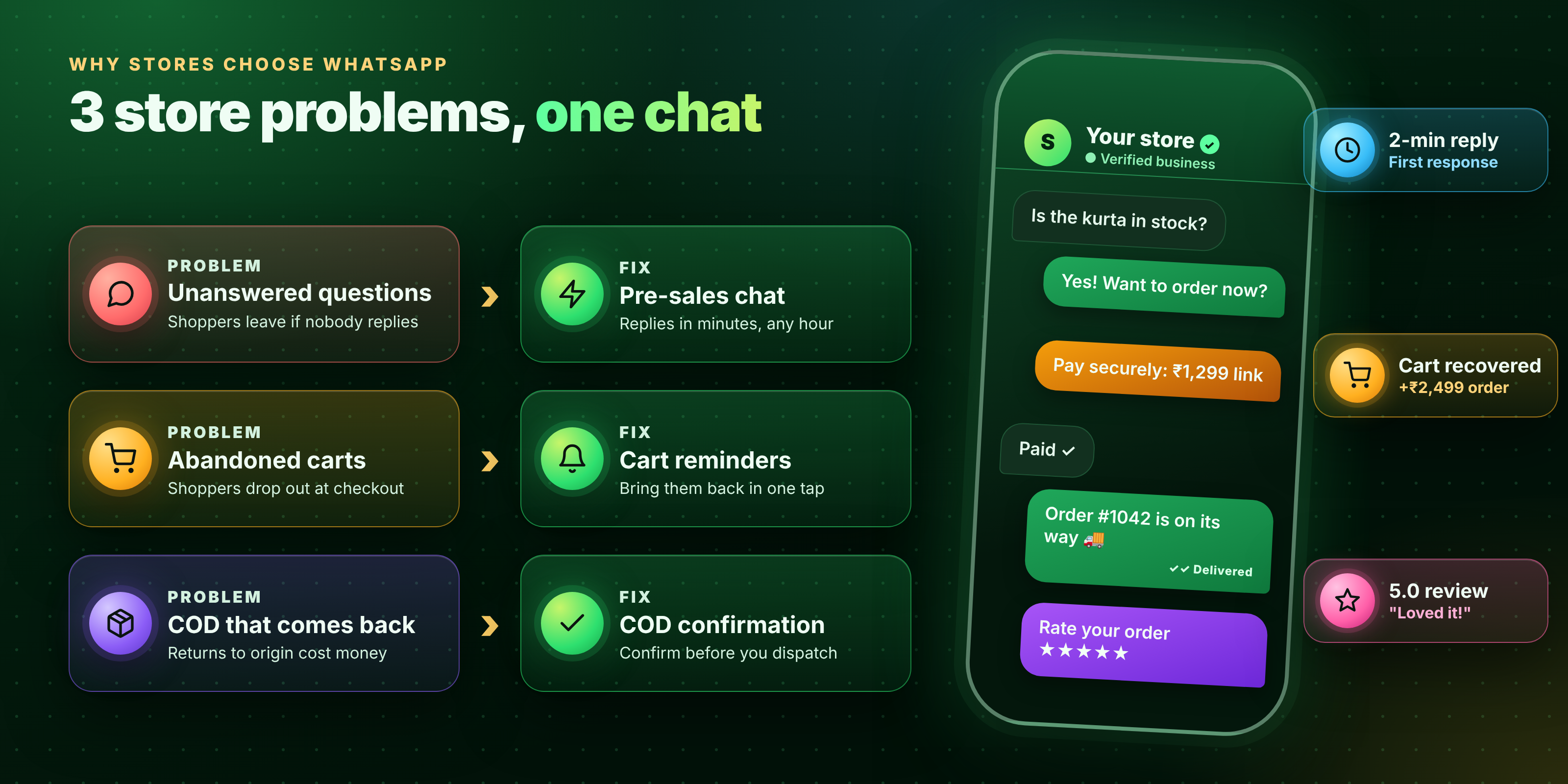
Figure 1: Three common store problems and how WhatsApp fixes each one
Quick answer: To use WhatsApp for ecommerce, connect your store to the WhatsApp Business API, collect opt-in, and automate four jobs: cart recovery, COD confirmation, order updates and reorder reminders. Keep a human ready for questions, and track recovered carts, returns and repeat orders.
Key facts at a glance
- Best for: D2C brands, marketplaces and online stores that sell to Indian shoppers, including cash-on-delivery orders.
- Needs: customer opt-in, the WhatsApp Business API through a provider and Meta-approved templates.
- Golden rule: help first, sell second, and never message people who did not opt in.
Why use WhatsApp for ecommerce?
Online stores lose sales in three places: unanswered questions, abandoned carts and cash-on-delivery (COD) orders that never arrive. WhatsApp reaches shoppers on an app they open daily, supports images, buttons and catalogues, and keeps pre-sale, order and support chats in one thread. More than 3 billion people use it each month (Business Standard).
12 ways to grow an online store with WhatsApp
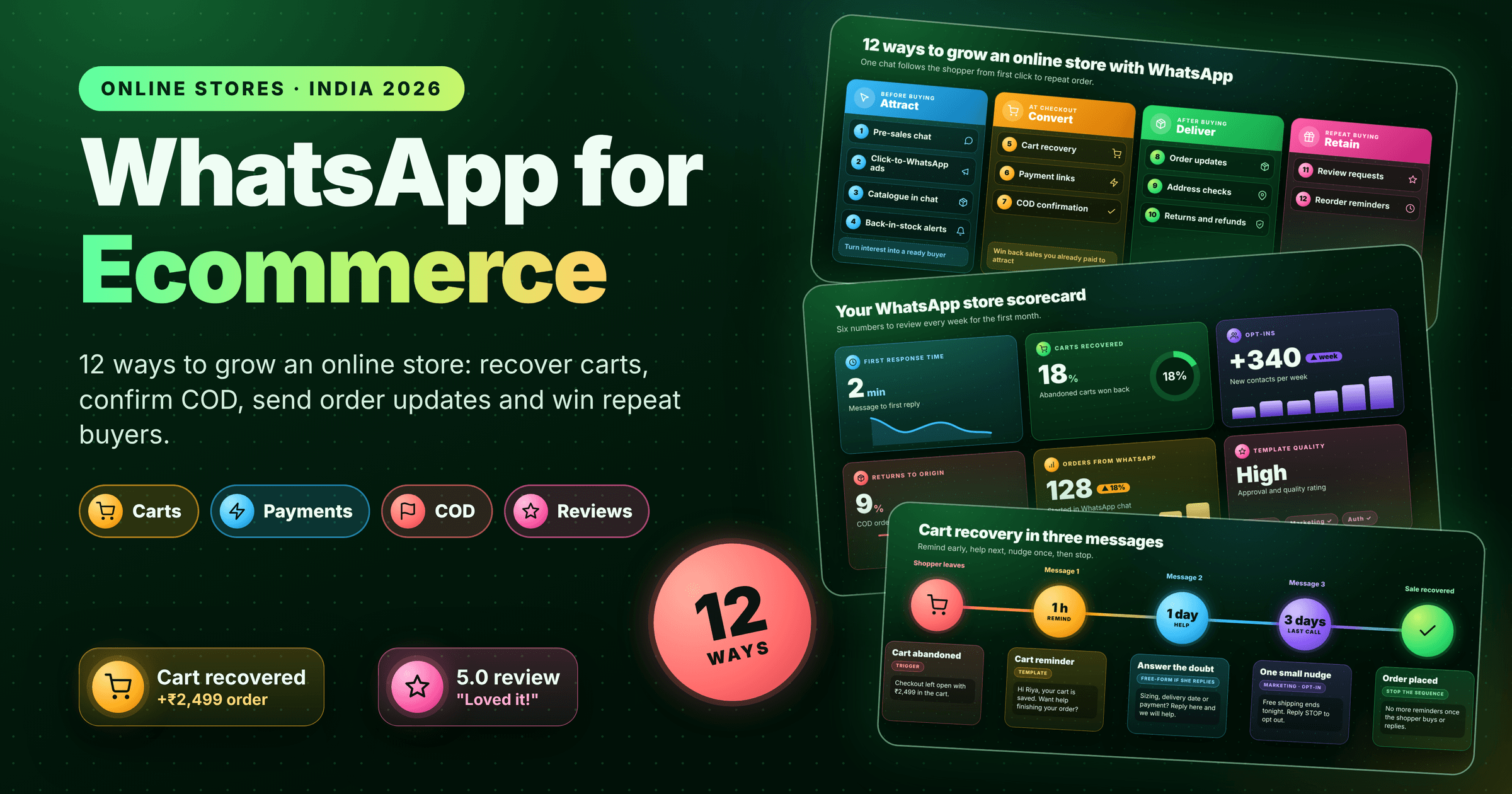
12 ways to use WhatsApp across the shopper journey: before buying (attract), at checkout (convert), after buying (deliver) and repeat buying (retain).
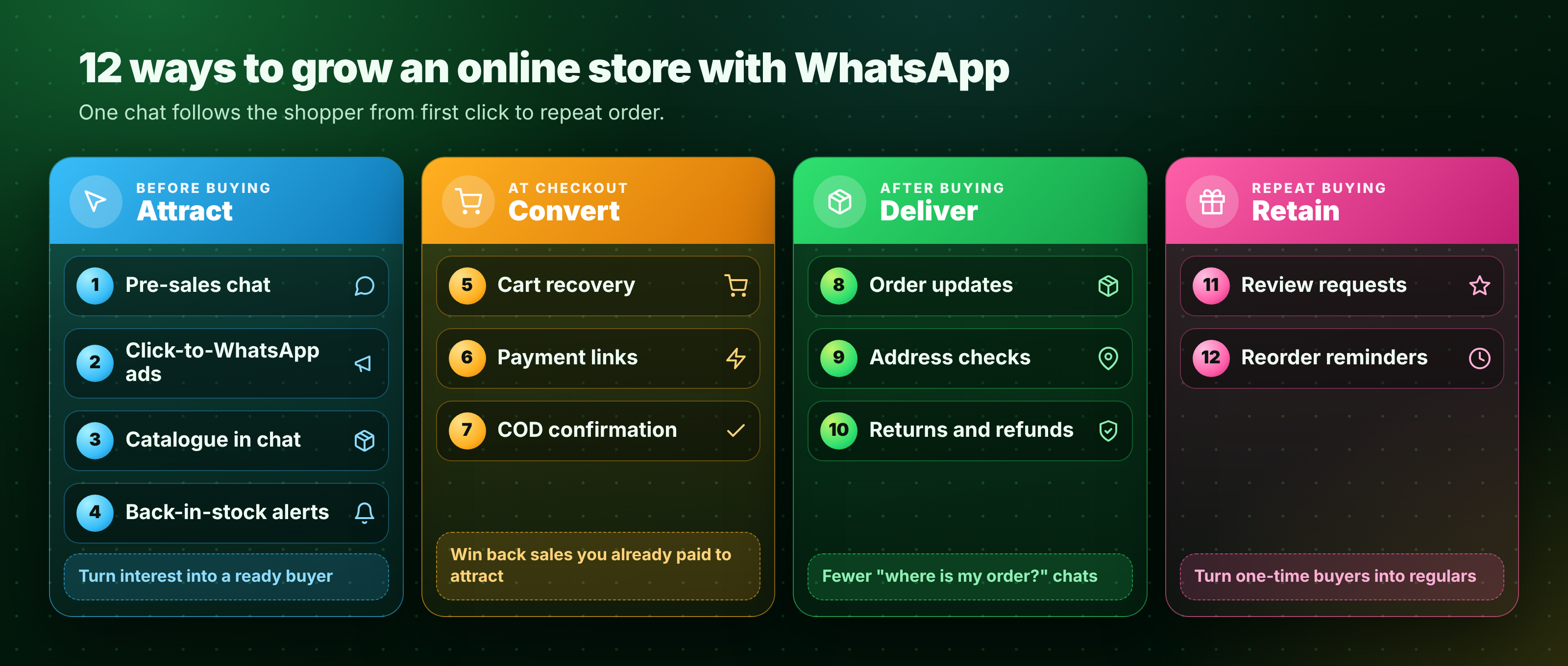
Figure 2: 12 ways to use WhatsApp across the shopper journey
Before buying: attract
- Pre-sales chat. Add a click-to-chat button on product pages so shoppers can ask about size, stock or delivery. Use automation for common questions and a person for the rest.
- Click-to-WhatsApp ads. Send ad clicks straight into a chat. Reply within 24 hours and Meta gives you a free window of up to 7 days.
- Catalogue in chat. Share product cards and a short list of bestsellers, so shoppers can choose without leaving the thread.
- Back-in-stock alerts. Let shoppers tap to be told when an item returns, then send one approved template.
At checkout: convert
- Abandoned cart recovery. Send a reminder about an hour later, answer doubts the next day, and stop after one last nudge. End the sequence when the shopper buys or replies.
- Payment links. Share a UPI or card link inside the chat so the shopper can pay in seconds.
- COD confirmation. Ask the shopper to reply 1 to confirm before dispatch. Confirmed orders are more likely to be accepted, which helps cut returns to origin (RTO).
A three-message cart recovery sequence: a reminder after 1 hour, help with doubts after 1 day and one last nudge after 3 days. The sequence stops once the shopper buys or replies.
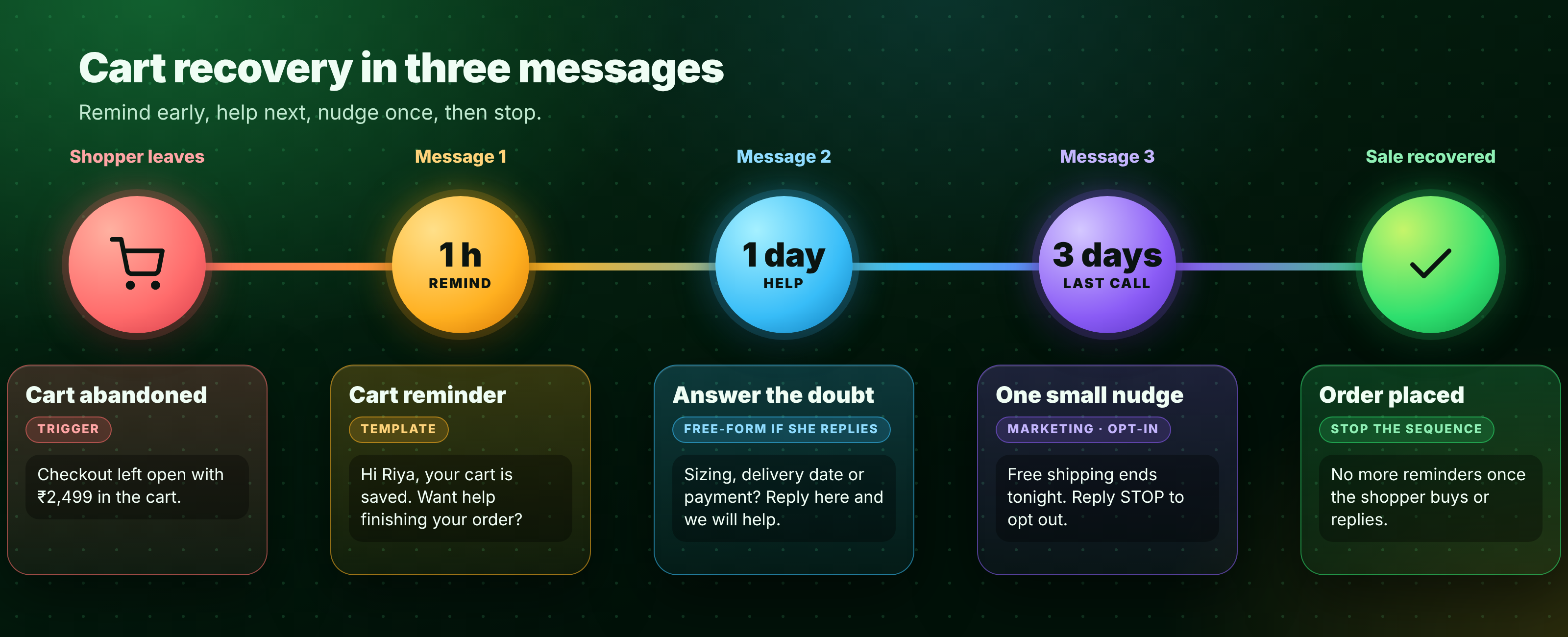
Figure 3: A three-message cart recovery sequence
After buying: deliver
- Order and delivery updates. Send confirmed, shipped, out-for-delivery and delivered messages. Fewer shoppers ask "where is my order?".
- Address checks. Ask shoppers to confirm incomplete addresses and reschedule failed deliveries in the same chat.
- Returns and refunds. Let shoppers start a return in chat and see its status, so the team handles fewer repeat tickets.
Repeat buying: retain
- Review requests. Ask for a 1 to 5 rating a few days after delivery, then link happy shoppers to your review page.
- Reorder reminders. For items that run out, such as skincare or food, remind shoppers before they need more. Win back lapsed buyers with one relevant offer.
Which ways should you start with?
| Start with | Why | Effort |
|---|---|---|
| Order updates | Cuts "where is my order?" chats | Low |
| COD confirmation | Helps reduce RTO costs | Low |
| Cart recovery | Wins back sales you already paid to attract | Medium |
| Reorder reminders | Grows repeat orders | Medium |
How to set up WhatsApp for your online store
The five parts of a WhatsApp ecommerce stack: your store, the WhatsApp Business API, templates, automation and a shared inbox. Orders, carts, customer profiles, payment status and chat history flow between them.
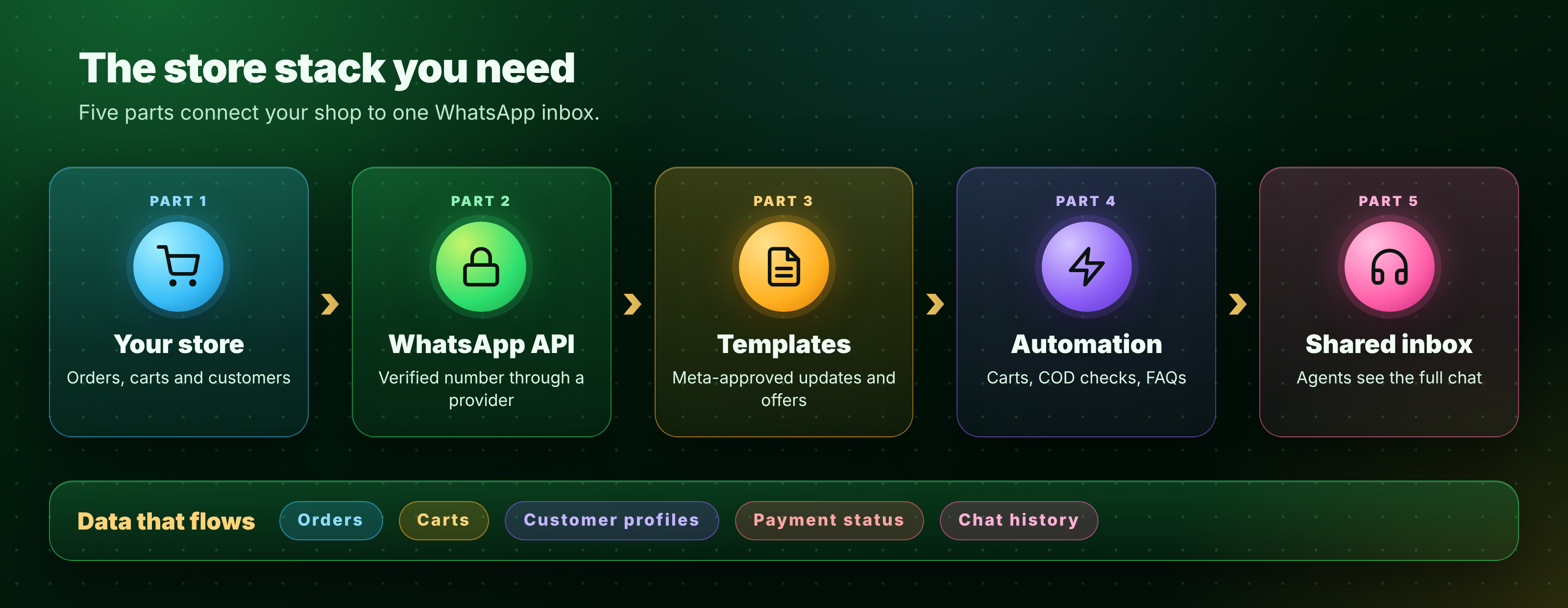
Figure 4: The five parts of a WhatsApp ecommerce stack
- Get API access. Choose a provider and complete Meta business verification. The WhatsApp Business API suits stores with several agents and automation.
- Connect your store. Link orders and carts via your provider so messages use real details.
- Collect opt-in. Add a tick box at checkout, a pop-up or a QR code on the parcel. Save the source and date.
- Submit templates. Order updates, cart reminders and offers need Meta approval, so submit early.
- Automate one flow. Start with order updates, then add carts and COD checks.
- Add a handoff. A shared inbox lets agents see the whole chat and take over.
Three templates you can copy
Utility · Order update ({{1}} name · {{2}} order number · {{3}} tracking link)
Hi {{1}}, your order {{2}} is out for delivery today. Track it here: {{3}}Utility · COD confirmation ({{1}} name · {{2}} order number · {{3}} amount)
Hi {{1}}, please confirm your COD order {{2}} of ₹{{3}}. Reply 1 to confirm or 2 to cancel.Marketing · Cart reminder ({{1}} name)
Hi {{1}}, your cart is saved. Want help finishing your order? Reply STOP to opt out.Cost check: on ChatDesq, marketing templates cost ₹1.036 each excl. GST, with a ₹0 platform fee. Chats from a Click to WhatsApp ad get a free window of up to 7 days after you reply (Meta pricing page). Rates change, so check before you budget, and estimate spend with the WhatsApp cost calculator.
What are the rules and mistakes to avoid?
- Get opt-in. Never message bought lists.
- Do not over-message. Cap offers, because blocks and reports hurt your quality rating.
- Offer a human. A bot that cannot hand over frustrates shoppers.
- Match the timing. Send delivery updates when they matter, not in bulk at night.
- Never collect passwords, OTPs or card numbers in chat.
How do you measure WhatsApp for ecommerce?
Review these weekly for the first month. Do not judge by messages sent. Judge by recovered carts, fewer returns and repeat orders.
Store scorecard with six sample metrics: first response time, carts recovered, opt-ins, returns to origin, orders from WhatsApp and template quality. The numbers are samples for illustration.
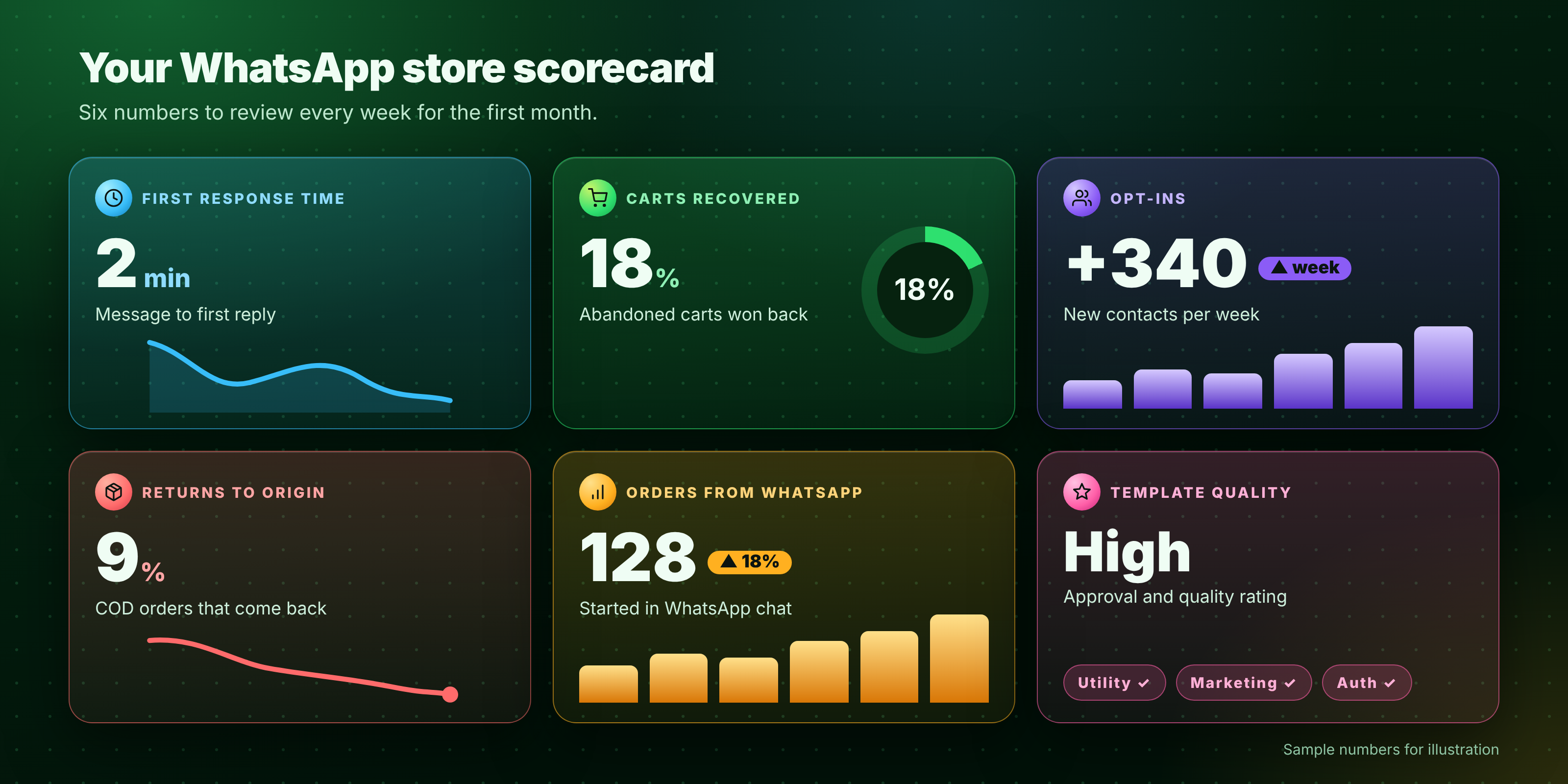
Figure 5: Six store metrics to review each week (sample numbers)
When does ChatDesq make sense?
If order questions pile up, carts go unrecovered or COD returns hurt margins, it is time to move to the API. ChatDesq combines an official WhatsApp Business API connection, a shared inbox, no-code automations and customer profiles. Read more about ChatDesq for ecommerce.
- ₹0 platform fee. Pay only for the messages you send.
- No quarterly or yearly plan. Top up from ₹500 and stop whenever you like.
- A real person replies within 2 hours, every day, 10:00-19:00 IST.
Ready to grow your store on WhatsApp?
Frequently Asked Questions
How can I use WhatsApp for ecommerce?
Use it for pre-sales chat, cart recovery, payment links, COD confirmation, order updates, returns, reviews and reorder reminders.
Do I need the WhatsApp Business API for an online store?
Yes, if you need automation, several agents or template campaigns. The WhatsApp Business App only covers manual chats.
Is WhatsApp better than SMS for ecommerce?
WhatsApp supports images, buttons and two-way chat, so shoppers can reply and act in one thread. SMS suits plain alerts.
Can I send offers without opt-in?
No. Get permission first and record where and when the shopper agreed.
Bottom line: start with order updates and COD confirmation, add cart recovery, then reorder reminders. Keep every message useful and hand over to a person fast.
Sources: Meta pricing documentation; Business Standard, “From chats to commerce: Why India is WhatsApp’s most important market”. Rates and sources checked 16 November 2026.
Written by
Social media Marketer, Chatdesq
She writes practical guides on WhatsApp lead follow-up, WhatsApp marketing, templates and automation for Indian businesses.