WhatsApp Message Templates That Bring Customers Back
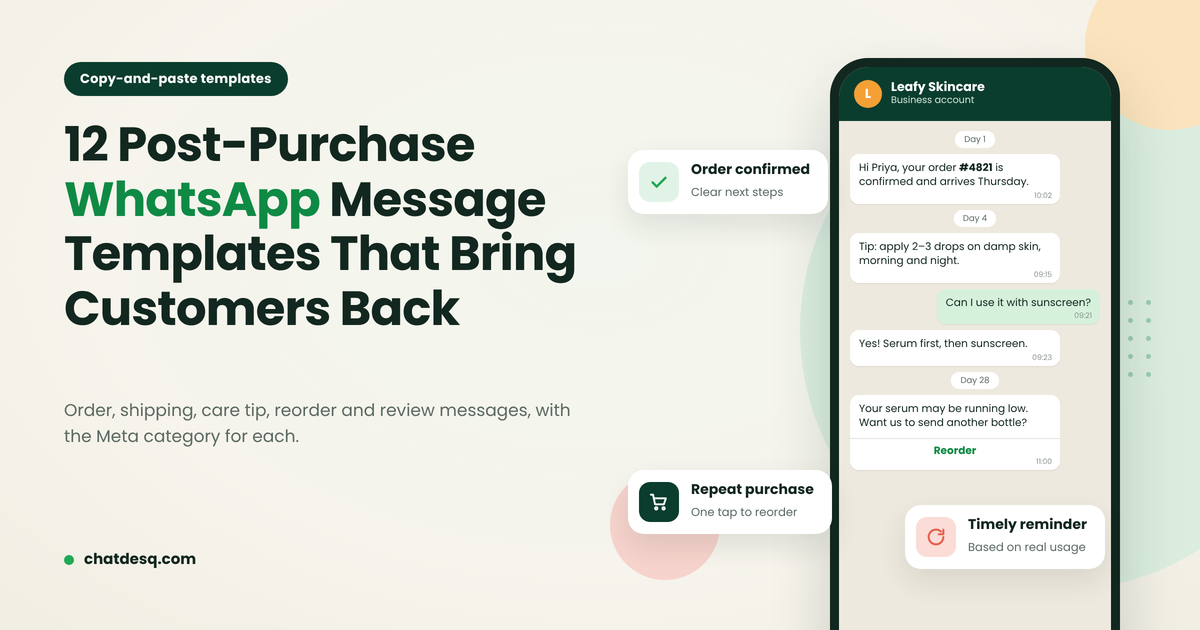
Copy-ready WhatsApp templates for order confirmations, shipping, care tips, reorder reminders and reviews, with the Meta category for each.
Contents▾
- Why Post-Purchase Messages Matter
- Three Rules Before You Copy
- Order Confirmation and Shipping Templates
- 1. Order confirmation (Utility)
- 2. Cash-on-delivery confirmation (Utility)
- 3. Order shipped (Utility)
- Delivery Issue and Refund Templates
- 4. Delivery delay (Utility)
- 5. Refund processed (Utility)
- Onboarding and Care Tip Templates
- 6. Delivered + how to use (Utility)
- 7. Appointment preparation (Utility)
- Reorder and Rebooking Reminder Templates
- 8. Refill reminder (Marketing)
- 9. Rebooking or service-due reminder (Marketing)
- Feedback and Review Templates
- 10. Quick rating (Utility)
- 11. Review request (Utility)
- Cross-Sell Template
- 12. Compatible product suggestion (Marketing)
- Which Templates to Start With
- Mistakes That Get Templates Rejected or Muted
- Send These Templates Automatically With ChatDesq
- Frequently Asked Questions
- What should I send a customer on WhatsApp after a purchase?
- Is an order confirmation a Utility or Marketing template?
- When should I send a WhatsApp reorder reminder?
- Do I need a template to reply to a customer?
- Why was my WhatsApp template rejected?
- Sources
*Quick answer: The best post-purchase WhatsApp messages confirm the order, help the customer use what they bought, fix problems fast and remind them to reorder at the right time. Send them only to customers who opted in, keep order updates (Utility templates) separate from offers (Marketing templates), and stop reminders as soon as the customer buys, replies or opts out.*
Why Post-Purchase Messages Matter
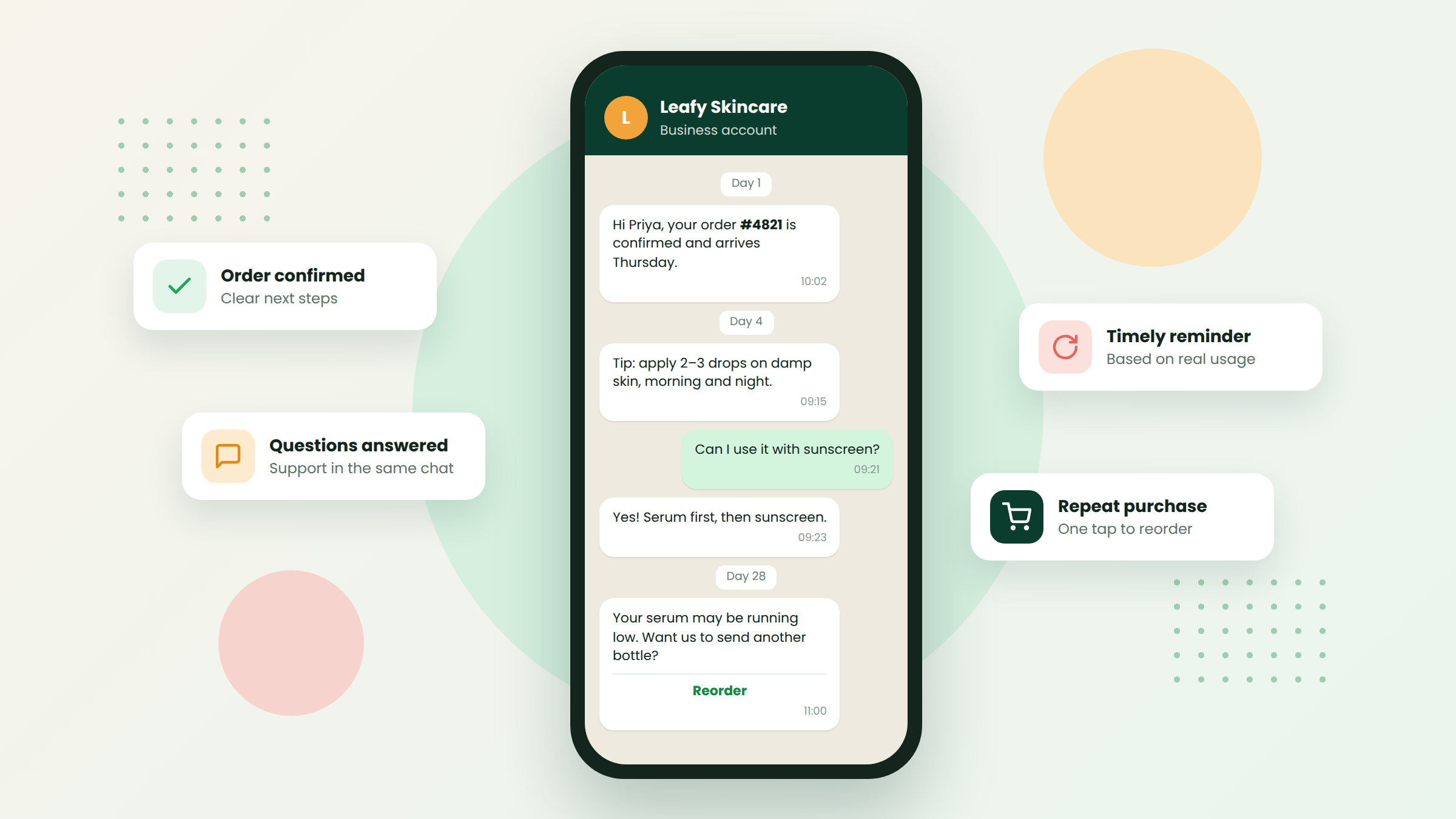
The days after a purchase decide whether a customer buys from you again. A clear confirmation and a useful tip build trust. A generic discount blast gets the chat muted.
Below are 12 copy-ready templates for each stage, each labeled with the Meta category it is likely to receive. Variables in double braces, such as {{1}}, are where WhatsApp inserts a name, order number or date. For journeys, segmentation and retention metrics, read our WhatsApp customer retention guide.
Three Rules Before You Copy
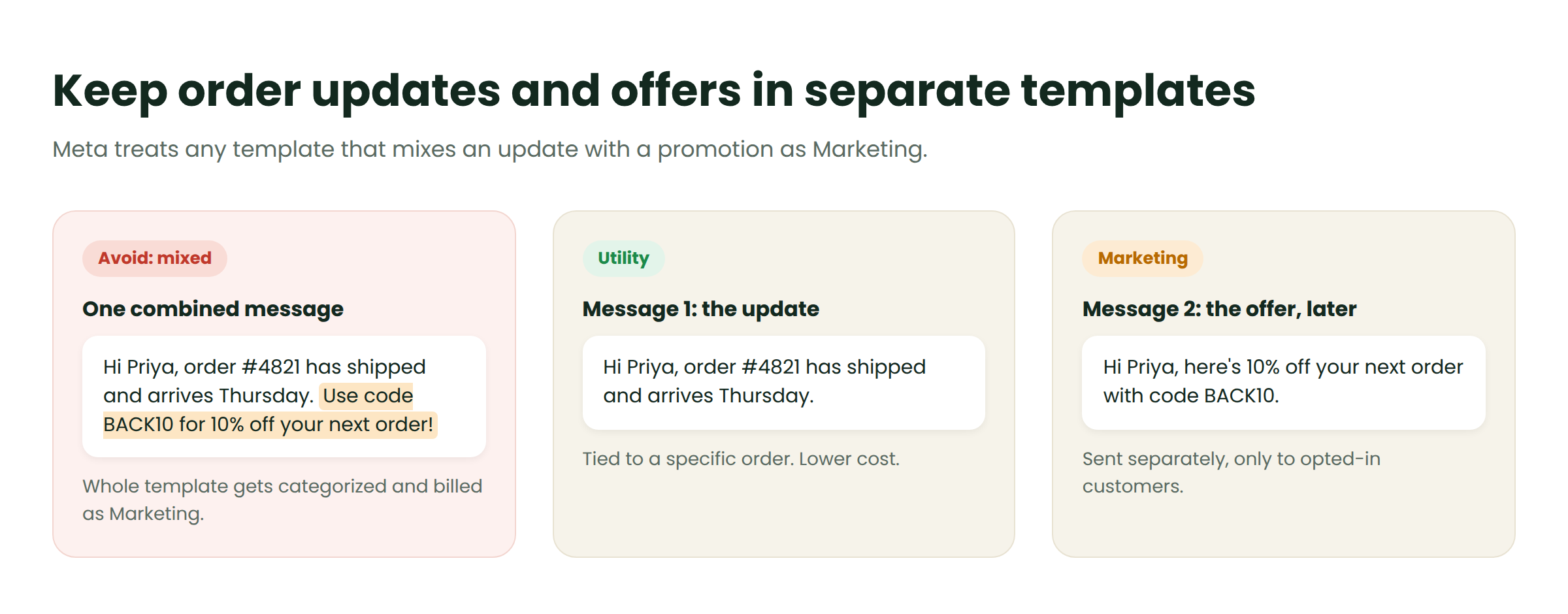
Match the category to the content. Meta sorts templates into Utility, Marketing and Authentication. Utility templates relate to a specific order, booking or request. Anything that promotes, upsells or re-engages is Marketing, which usually costs more.
Never mix an update with an offer. A shipping update that includes a coupon is treated as Marketing. Send two separate templates instead.
Message only customers who opted in. Tell them what you will send and how to stop. When a customer messages you first, you can reply freely within the 24-hour customer service window, without a template.
Order Confirmation and Shipping Templates
The first message should answer one question: did my order go through?
1. Order confirmation (Utility)
Send: immediately after payment.
Hi {{1}}, thank you for your order! Order {{2}} is confirmed. Total: {{3}} Expected delivery: {{4}} Questions? Just reply to this chat. Button: View order
2. Cash-on-delivery confirmation (Utility)
Send: right after a COD order, to cut fake orders and returns.
Hi {{1}}, we received your cash-on-delivery order {{2}} for {{3}}. Please confirm so we can ship it today. Buttons: Confirm order · Cancel order
3. Order shipped (Utility)
Send: when the courier picks up the parcel.
Good news, {{1}}! Order {{2}} has shipped with {{3}}. Tracking number: {{4}} Estimated delivery: {{5}} Button: Track package
Delivery Issue and Refund Templates
Tell customers about a problem before they ask, and never add an offer.
4. Delivery delay (Utility)
Hi {{1}}, we're sorry: order {{2}} is running late because of {{3}}. New expected delivery: {{4}} We'll message you again when it's on the way.
5. Refund processed (Utility)
Hi {{1}}, we've received your return for order {{2}}. Your refund of {{3}} has been sent to {{4}} and should arrive within {{5}} working days. Handle replies in a shared team inbox so every agent sees the order history and customers never repeat themselves.
Onboarding and Care Tip Templates
Customers who never learn to use a product rarely rebuy it.
6. Delivered + how to use (Utility)
Send: 1–2 days after delivery.
Hi {{1}}, we hope your {{2}} arrived safely! Quick tip to get the best results: {{3}} Questions? Reply here and we'll help. Example for {{3}}: "Apply the serum to damp skin at night and use sunscreen in the morning."
7. Appointment preparation (Utility)
Send: 24 hours before a salon, clinic, class or home-service visit.
Hi {{1}}, your {{2}} is booked for {{3}} at {{4}}. To prepare: {{5}} Need a different time? Reply here. Buttons: Confirm · Reschedule
An AI agent can answer routine follow-up questions instantly and hand complex ones to a person.
Reorder and Rebooking Reminder Templates
Reminders drive repeat sales when they arrive just before the customer runs out. Work out the timing like this:
Reminder day = (pack size ÷ daily use) − delivery time − 2 to 3 days buffer
For example, a 3 kg bag of dog food used at 100 g a day lasts 30 days. With 3-day delivery, send the reminder on day 24 or 25.
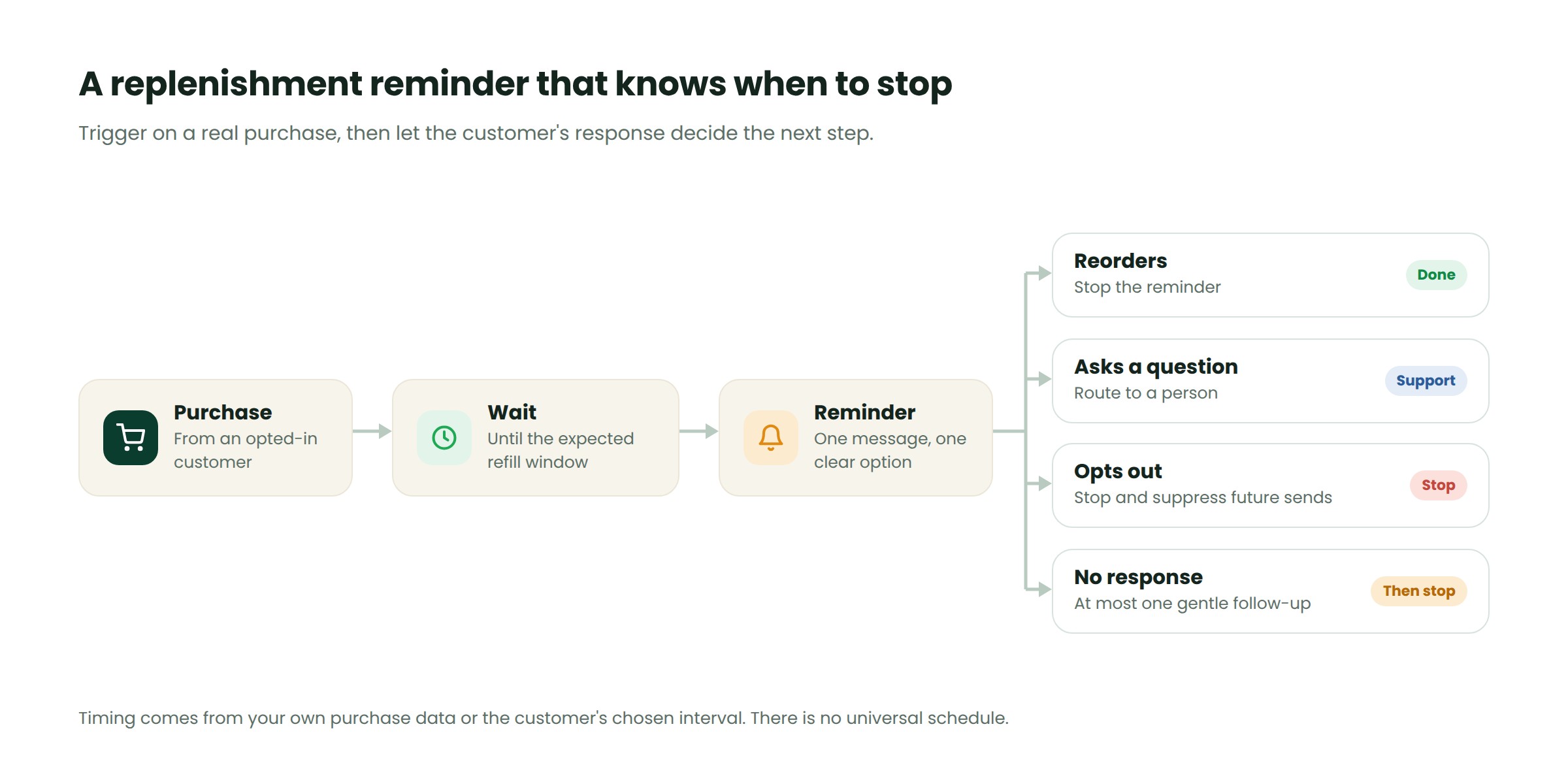
Send one reminder, then stop when the customer reorders, replies or opts out. No-code automation can run this stop logic for you.
8. Refill reminder (Marketing)
Hi {{1}}, your {{2}} is probably running low. Want the same again? It takes one tap. Reply STOP to turn off these reminders. Buttons: Reorder now · Remind me later
9. Rebooking or service-due reminder (Marketing)
Use for: salons, clinics, AC servicing, water purifier filters.
Hi {{1}}, it's been {{2}} since your last {{3}}. Would you like to book your next visit? Button: See available slots
Feedback and Review Templates
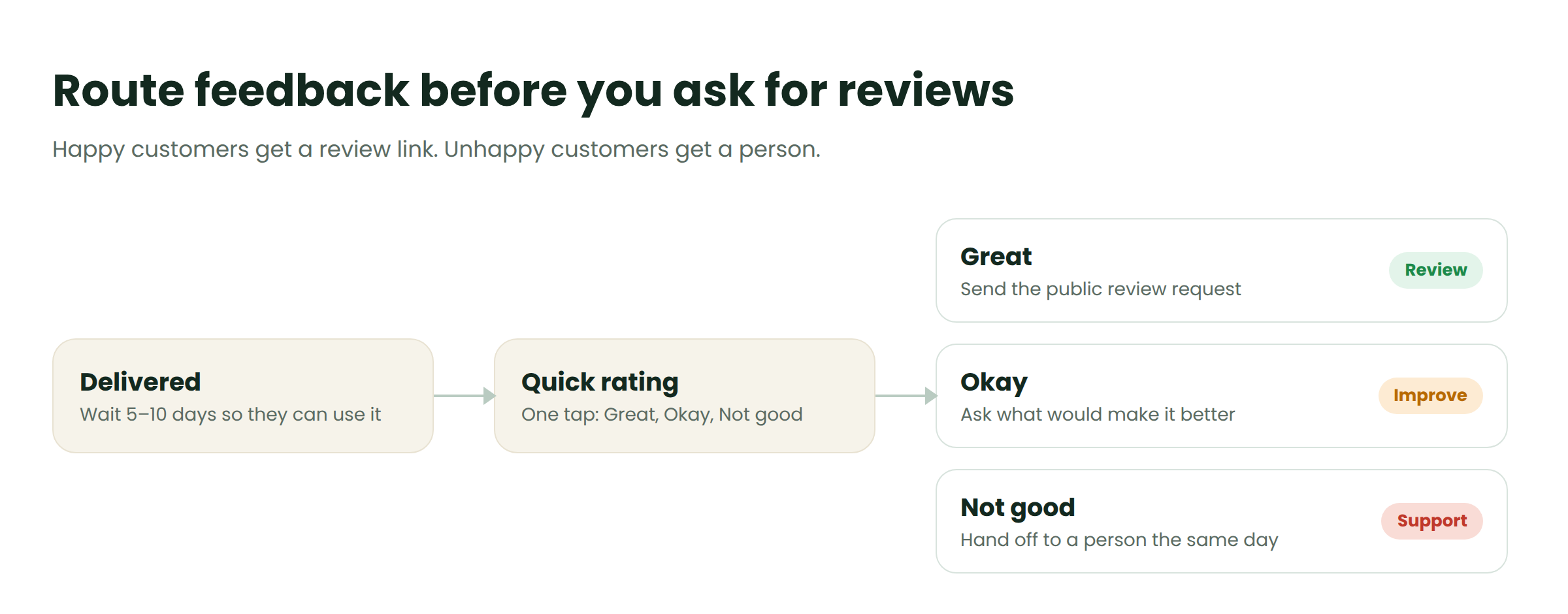
Ask for feedback once the customer has used the product, usually 5–10 days after delivery, or the same day for a service. A feedback request tied to a specific order can qualify as Utility; adding a coupon makes it Marketing.
10. Quick rating (Utility)
Hi {{1}}, how was your experience with order {{2}}? Tap a rating below. It takes five seconds. Buttons: Great · Okay · Not good
If the customer taps "Not good", reply personally within the service window and ask what went wrong.
11. Review request (Utility)
Send: only after a positive rating.
Thank you, {{1}}! We're glad you liked your {{2}}. Would you share a short review? It helps other customers decide. Button: Write a review
Cross-Sell Template
Offers work when they connect to what the customer already bought. "Filters that fit your machine" earns a tap; "50% off everything" sent after a complaint earns a block.
12. Compatible product suggestion (Marketing)
Send: 2–4 weeks after purchase, never while a support issue is open.
Hi {{1}}, enjoying your {{2}}? Many customers add {{3}}, which fits your {{2}} and {{4}}. Button: See {{3}}
Send Marketing templates as segmented, opt-in broadcasts, never as blasts to your whole list.
Which Templates to Start With
You don't need all 12. Start with three or four that match how your customers buy.
| Business type | Start with | Add later |
|---|---|---|
| D2C and ecommerce | #1, #3, #6 | #8, #10, #12 |
| Cash-on-delivery sellers | #2, #3, #4 | #5, #10 |
| Salons and clinics | #7, #10 | #9, #11 |
| Home services | #7, #4 | #9 |
| Subscriptions | #1, #6 | #8, #12 |
Store owners can trigger these from orders with WhatsApp commerce.
Mistakes That Get Templates Rejected or Muted
- Adding a coupon to an order update. It turns Utility into Marketing.
- Too many variables. A template that is mostly {{1}} {{2}} {{3}} is often rejected. Keep enough fixed text to show its purpose.
- Reminding after a reorder. It looks careless and drives opt-outs.
Send These Templates Automatically With ChatDesq
The free WhatsApp Business app works for a handful of customers. These templates, though, depend on triggers: an order placed, a parcel delivered, a refill window reached. Once that relies on memory, messages go out late or not at all.
ChatDesq runs on the official WhatsApp Business API, with templates managed in-app. You can trigger messages from orders and bookings, stop reminders automatically, and answer replies from one inbox with your whole team.
Create your free ChatDesq account or book a demo.
Frequently Asked Questions
What should I send a customer on WhatsApp after a purchase?
An order confirmation with the order number and delivery date, then shipping updates, a care or usage tip after delivery, and a feedback request a few days later.
Is an order confirmation a Utility or Marketing template?
A plain order confirmation is Utility because it relates to a specific transaction. Adding a discount or product suggestion usually makes it Marketing.
When should I send a WhatsApp reorder reminder?
Shortly before the customer is likely to run out. Divide pack size by daily use, then subtract delivery time and a 2–3 day buffer.
Do I need a template to reply to a customer?
No, if the customer messaged you first and you reply within 24 hours. You need an approved template to start a conversation or to message after that window.
Why was my WhatsApp template rejected?
Usually because of promotional wording in a Utility template, too many variables, an unclear purpose, or a language setting that doesn't match the text.
Sources
Written by
Product Manager, ChatDesq
Akash leads product at ChatDesq. He writes about WhatsApp Business API pricing, campaigns and customer support for Indian businesses.