How to Automate Appointment Booking and Reminders on WhatsApp
Learn WhatsApp appointment scheduling in 6 steps: map the booking flow, automate confirmations, send reminders, handle reschedules and track no-shows.
Contents▾
- Step 1: When does manual appointment booking become hard to manage?
- Step 2: How do you map the booking flow from enquiry to confirmation?
- Step 3: How do you set up automated WhatsApp appointment confirmations?
- Step 4: What WhatsApp appointment reminders should you send, and when?
- Step 5: How do you handle rescheduling and follow-up messages?
- Step 6: How do you measure no-shows, booking completion and time saved?
- What does WhatsApp appointment scheduling look like for clinics, salons, consultants and service businesses?
- Where should you start?
- Frequently Asked Questions
- Can I set up WhatsApp appointment scheduling without coding?
- Do appointment reminders need a template?
- Which message category do reminders fall under?
- What if a customer replies to a reminder with a question?
- Sources
*Quick answer: WhatsApp appointment scheduling means customers request a slot in a WhatsApp chat, and your business confirms it, reminds them and handles changes automatically. You can set it up in six steps: spot the manual workload, map the booking flow, automate confirmations, schedule reminders, handle reschedules and follow-ups, then measure results.*
If customers already message you on WhatsApp, booking there saves them a call or an app download. The examples below cover clinics, salons, consultants and service businesses, and make no promises about results.
Step 1: When does manual appointment booking become hard to manage?
Manual booking becomes hard to manage when the same questions and slot-juggling eat staff time that should go to customers. The clearest signs are late replies, double bookings and no-shows nobody chased.
Look for these signs:
- Enquiries sit unanswered after closing time.
- Staff type "what is free on Thursday?" replies all day.
- Slots live in chats, a notebook and a calendar, so double bookings happen.
- Nobody reminds customers, so gaps appear at the last minute.
Log a baseline first. For one week, note enquiries received, confirmed bookings, no-shows and the minutes staff spend on booking messages. You will compare against these in Step 6.
Step 2: How do you map the booking flow from enquiry to confirmation?
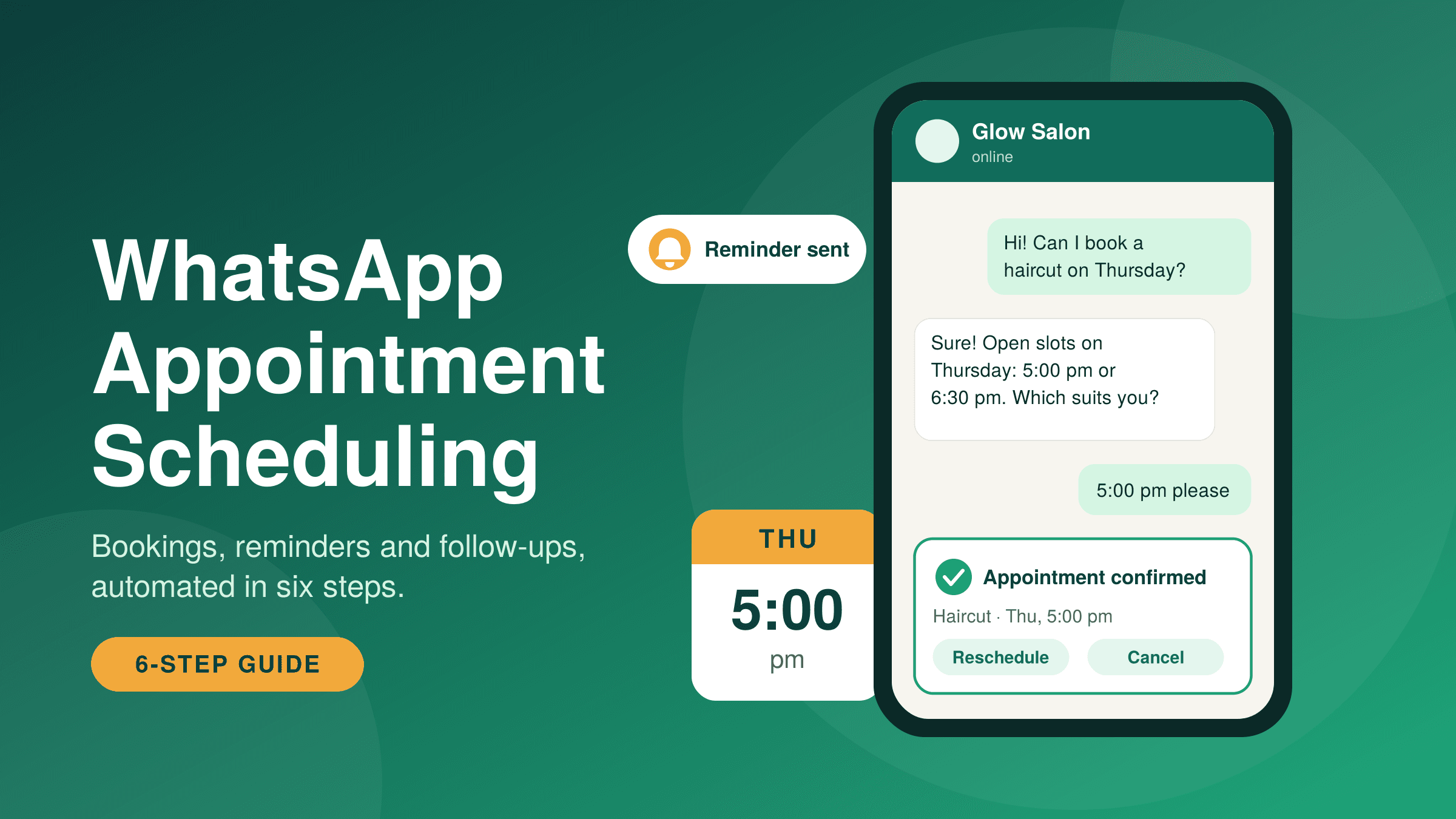
Map the flow as three moments: the enquiry, the availability check and the confirmation. Write down what the customer sends, what your business replies, and who steps in when the answer isn't simple.
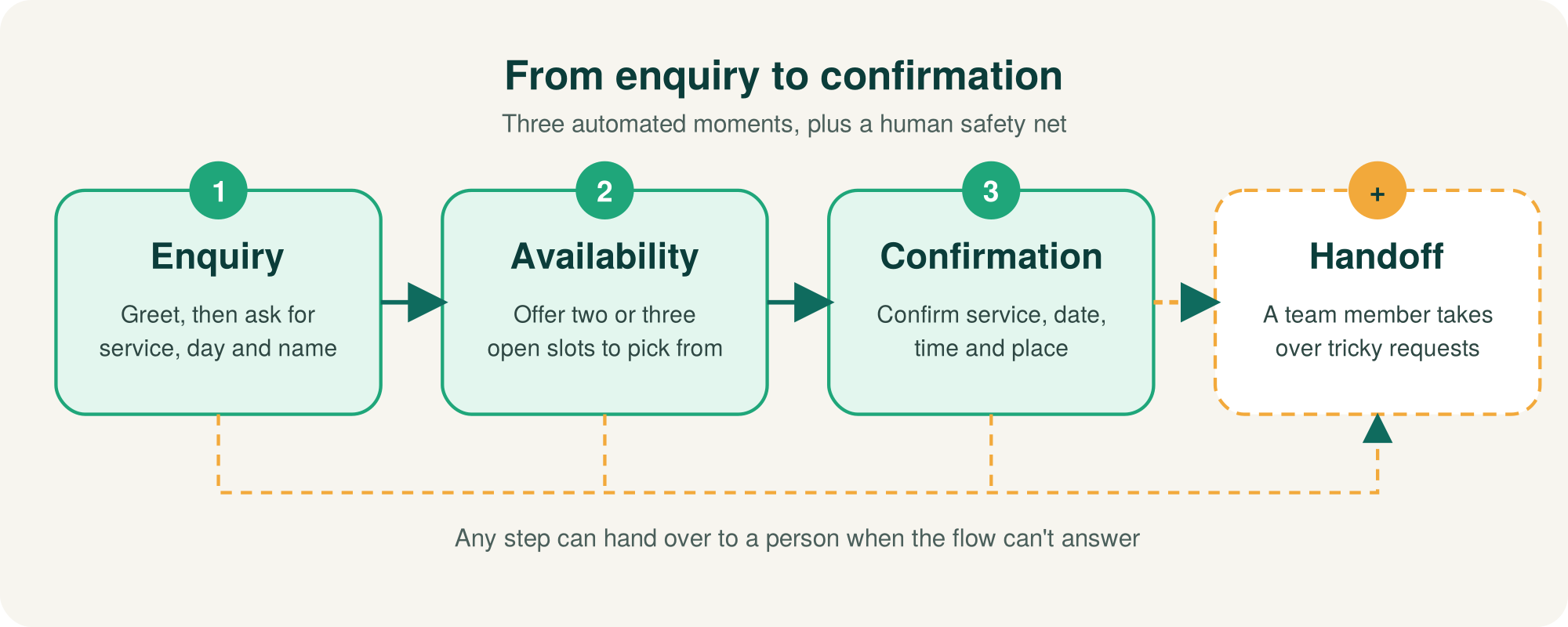
- Enquiry. Greet the customer and ask for the service, preferred day and name.
- Availability. Offer two or three open slots instead of an open question, and check them against your calendar or booking sheet.
- Confirmation. When the customer picks a slot, confirm the service, date, time and place in one message.
- Handoff. Send anything the flow can't answer to a person in your shared inbox.
Ask one question per message; "Thursday 5 pm" is an easy reply on a phone. Build this with WhatsApp automation or an AI agent, as long as a human can take over.
Step 3: How do you set up automated WhatsApp appointment confirmations?
Send a confirmation the moment a slot is booked, using an approved utility template. Meta's documentation says utility templates are typically sent in response to a customer's action or request, such as a booking.
Example template body. Variables in double braces, such as {{1}}, are where WhatsApp inserts the customer's name, service, date, time and place:
Hi {{1}}, your {{2}} appointment is confirmed for {{3}} at {{4}}, at {{5}}. Need to change it? Use the buttons below. Buttons: Reschedule · Cancel · Call us
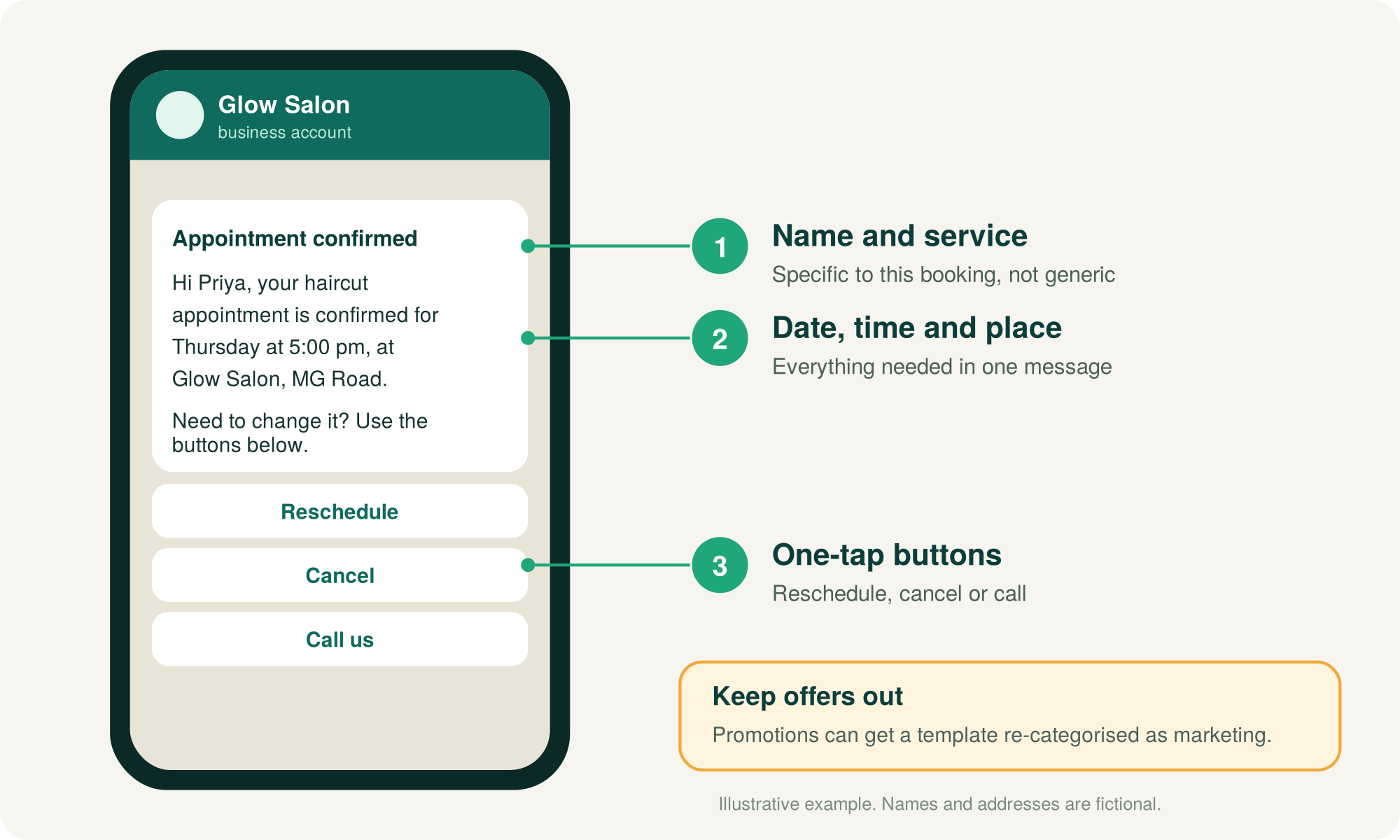
Add buttons so the customer can act in one tap. Meta supports quick-reply, phone number and link buttons on utility templates. Check which of them your platform offers.
- Keep offers out. Meta re-categorises a utility template containing marketing material as marketing.
- Submit early. Template review can take up to 24 hours.
- Message opted-in customers only, such as people who booked through WhatsApp.
Step 4: What WhatsApp appointment reminders should you send, and when?
Send one reminder the day before and a short one a few hours before the visit, each repeating the date, time and place with one-tap Confirm, Reschedule and Cancel buttons.
Once the customer's last message is more than 24 hours old, only approved templates can be sent, so reminders need a template like the one in Step 3.
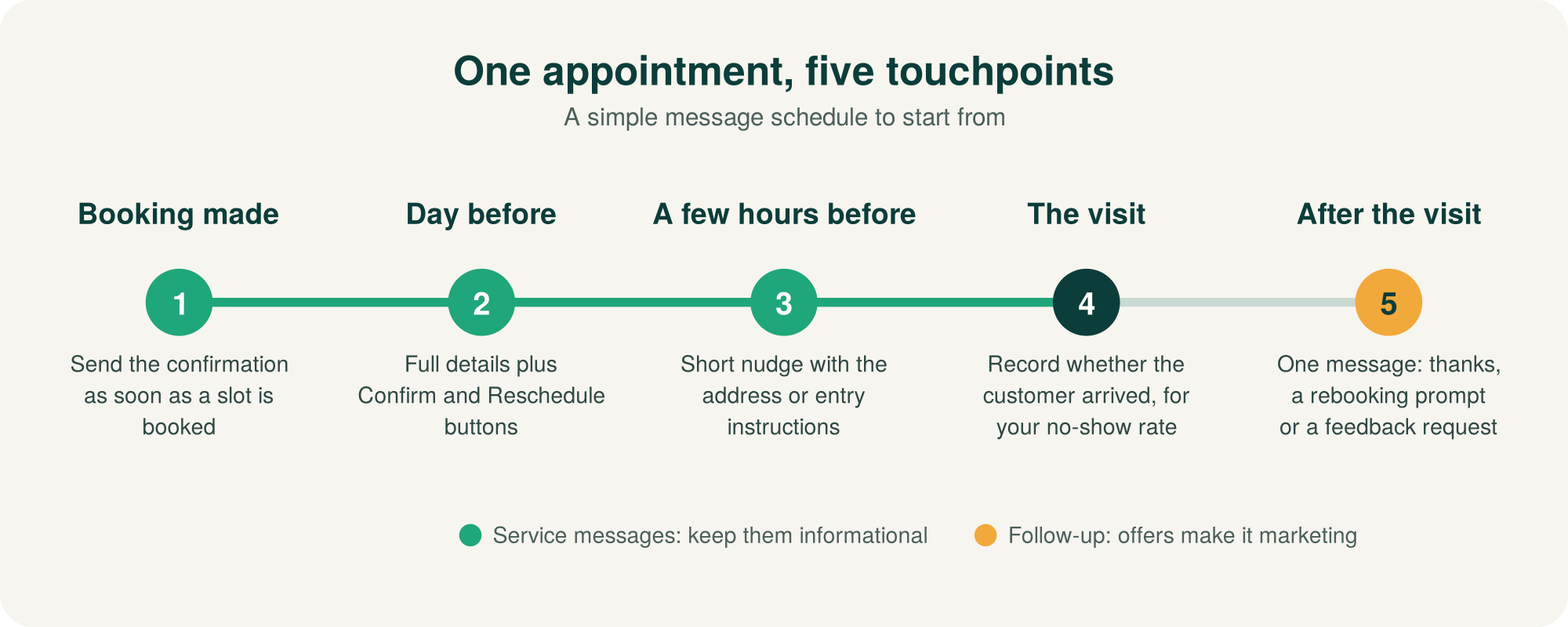
- Day before: full details plus buttons.
- Same day: a brief nudge with the address or entry instructions.
- Tone: informational only. A reminder that sells something risks being treated as marketing.
Adjust the timing using your own no-show data, and reopen a slot immediately when a customer reschedules or cancels.
Step 5: How do you handle rescheduling and follow-up messages?
Keep rescheduling in the same chat: a Reschedule button offers two or three new slots and releases the old one once the customer picks. After the visit, send one follow-up thanking them and inviting them to rebook or share feedback.
- Cancel: confirm, offer to rebook and free the slot for your waiting list.
- Edge cases: requests like "can I come after 8 pm?" go to a person in the shared inbox.
- Follow-up: one message after the visit. Wait for a reply before sending more.
If a follow-up includes a discount or promotion, Meta treats it as marketing material. On ChatDesq that is billed at ₹1.036 instead of ₹0.138 per message, excl. GST.
Step 6: How do you measure no-shows, booking completion and time saved?
Track three numbers every week: no-show rate, booking completion rate and staff minutes spent on booking messages. Compare each against the baseline you logged in Step 1.
- No-show rate: customers who didn't arrive ÷ confirmed appointments.
- Booking completion rate: confirmed bookings ÷ booking chats started.
- Time saved: baseline weekly minutes − current weekly minutes.
Don't expect a fixed improvement. Results depend on your service, customers and message clarity, so judge the trend over several weeks of your own data.
Change one thing at a time, such as reminder timing, so you know what caused any shift.
What does WhatsApp appointment scheduling look like for clinics, salons, consultants and service businesses?
The flow is the same everywhere; the details change. Adapt the confirmation, reminder and follow-up to your service.
| Business | Enquiry asks for | Confirmation includes | Reminder and follow-up focus |
|---|---|---|---|
| Clinic | Doctor or department, preferred day | Doctor, date, time, clinic address | Day-before reminder; bring-along items; follow-up visit only if the doctor advised it |
| Salon | Service, stylist, preferred time | Service, stylist, duration, address | Same-day nudge; rebooking prompt after the visit |
| Consultant | Topic, call or in-person | Date, time, meeting link or address | Link or address a few hours before; next-session prompt |
| Home-service business | Address, issue, time window | Technician name, arrival window, address | Window reminder; job-completion check-in |
For clinics, share only logistics such as time and place, not medical details. See WhatsApp for healthcare.
Where should you start?
Begin with the booking confirmation and the day-before reminder, then add rescheduling and the follow-up.
ChatDesq is a WhatsApp marketing and support tool on the official WhatsApp Business API. ₹0 platform fee. Pay only for the messages you send. Marketing ₹1.036, utility / authentication / service ₹0.138 per message, excl. GST. No quarterly or yearly plan. Top up from ₹500 and stop whenever you like.
Check the numbers on the pricing page or estimate your own volume with the WhatsApp cost calculator. A real person replies within 2 hours, Mon-Sat, 10:00-19:00 IST.
Create your ChatDesq account or book a demo.
Frequently Asked Questions
Can I set up WhatsApp appointment scheduling without coding?
Often, yes. You write the messages in plain text and set the flow in an automation tool. Templates still need Meta approval, and someone must keep your availability up to date.
Do appointment reminders need a template?
Yes, once the customer's last message is more than 24 hours old. Meta allows only approved templates outside the customer service window. Inside that window you can send ordinary free-form replies.
Which message category do reminders fall under?
Booking confirmations and reminders normally fit Meta's utility category, because they relate to a customer's request. Adding offers can get a template re-categorised as marketing.
What if a customer replies to a reminder with a question?
Route it to a person. Send replies the flow can't answer to your shared inbox so a team member responds while the 24-hour window is still open.
Sources
Written by
Social media Marketer, Chatdesq
Surya Ranjha is a digital marketer and content writer passionate about technology, AI, and the evolving world of digital communication. He specializes in creating insightful, research-driven content on SEO, WhatsApp marketing, SaaS, and emerging digital trends. With a focus on making complex ideas accessible and actionable, he aims to help businesses and readers navigate the digital landscape with clarity and confidence.