What Is the WhatsApp Business API? A Small Guide for Businesses
The ChatDesq Team · October 29, 2026
Last updated: 29 October 2026.
Quick answer: The WhatsApp Business API (officially the WhatsApp Business Platform) is Meta's interface that lets a business send and receive WhatsApp messages through software, with automation, chatbots and many agents on one number. You access it through a Business Solution Provider or Meta's Cloud API, and pay Meta a per-message fee for template messages.
Key facts at a glance (October 2026)
- Best for: businesses messaging hundreds or thousands of customers with more than one agent.
- Hosting: Cloud API only. Meta ended the On-Premises API on 23 October 2025.
- India cost: ₹0.8631 per marketing message and ₹0.1150 per utility or authentication message, before 18% GST and provider fees.
- Free allowance: first 1,000 service messages per number each month.
- Same number as the app? Often yes, through coexistence, if your provider supports it.
What is the WhatsApp Business API?
If you searched "whatsapp business api kya hai", here is the plain answer. The WhatsApp API lets your team and tools talk to customers through software instead of a phone. Customers see one verified business number. Behind it, many agents, a WhatsApp chatbot, a WhatsApp CRM and automated alerts work together.
It powers WhatsApp broadcast campaigns, WhatsApp automation, order updates and large-scale WhatsApp marketing. The reach is huge, as WhatsApp reports more than 3 billion monthly users.
How is it different from the WhatsApp Business app?
Short version: the app is for one person, the API is for a team. Comparing whatsapp business app vs api comes down to scale and automation.
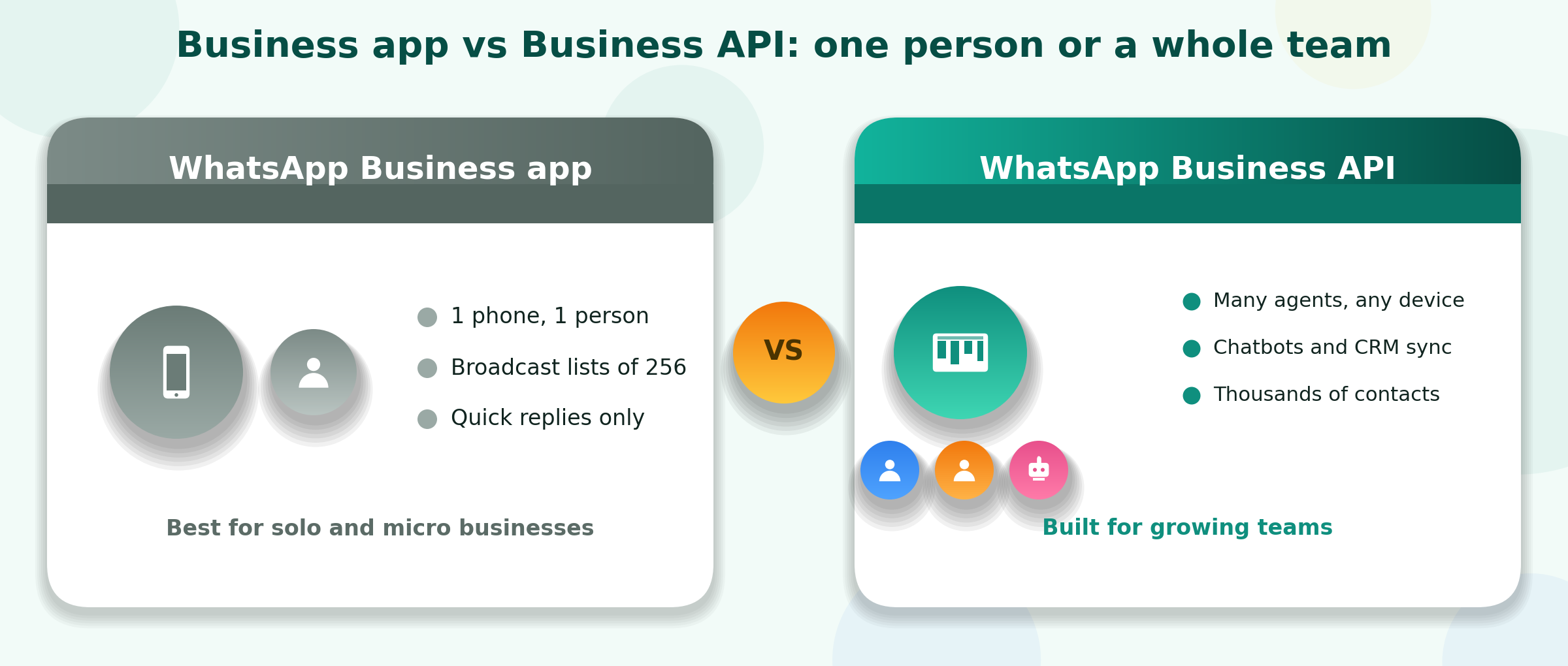
Figure 1: Business app vs Business API at a glance
| Feature | WhatsApp Business app | WhatsApp Business API |
|---|---|---|
| Who uses it | One owner on one phone | Teams, bots and software |
| Broadcasts | 256 contacts per list | Thousands, within your tier limit |
| Agents on one number | One (plus linked devices) | Many, on any device |
| Automation, chatbot, CRM | Quick replies only | Full flows, AI chatbots, CRM sync |
| Cost | Free | Per template message plus provider plan |
How does the WhatsApp Business API work?
Five pieces connect to make it work:
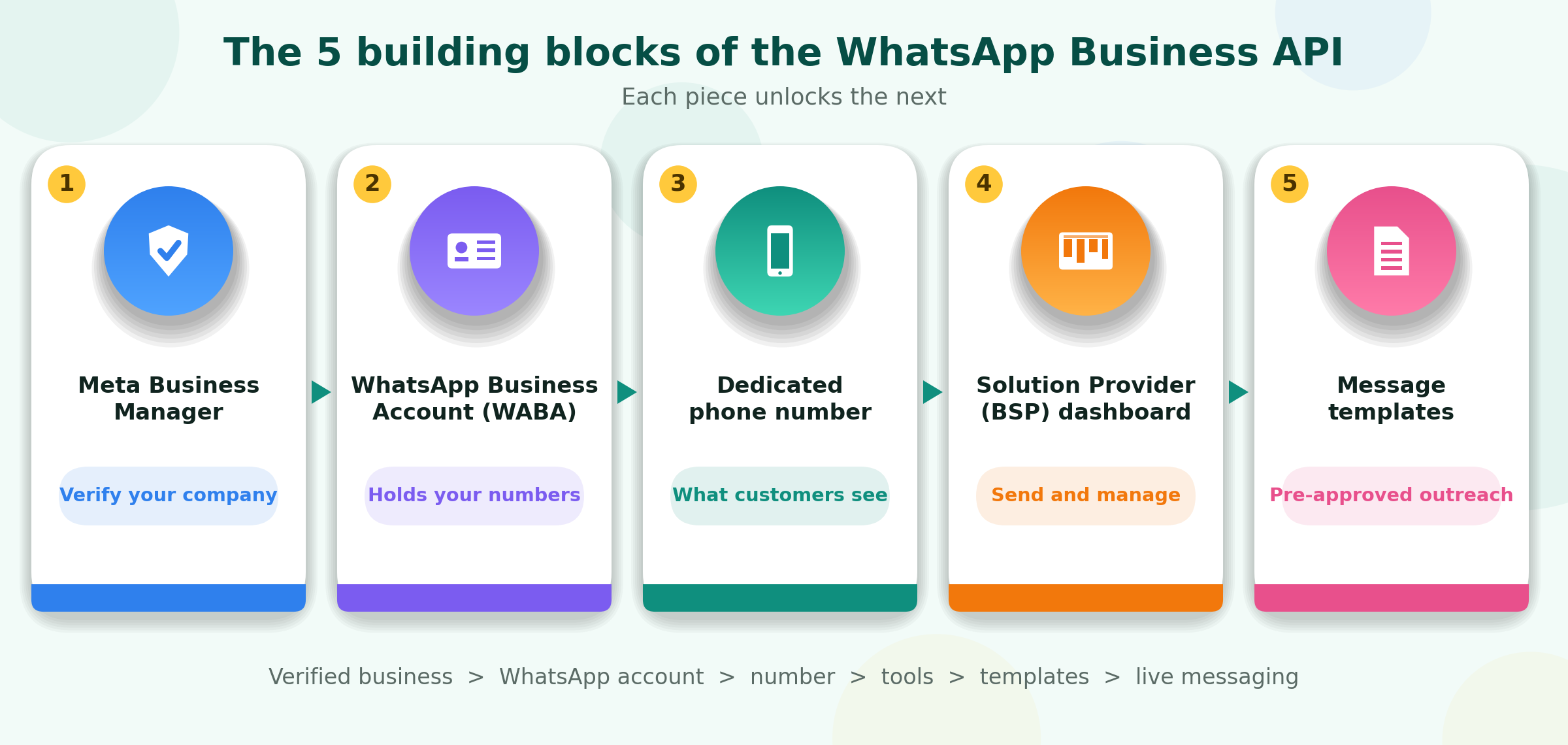
Figure 2: How the five building blocks connect
- Meta Business Manager verifies your company.
- WhatsApp Business Account (WABA) holds your numbers and settings.
- A phone number your customers message.
- A WhatsApp Business Solution Provider (BSP) gives you a no-code dashboard.
- Message templates are pre-approved WhatsApp message templates for starting chats outside the 24-hour window.
Is there still a Cloud API vs on-premise choice?
No. Many guides still list two hosting options, but that is outdated. Meta's own notice says the On-Premises API can no longer send messages, so every number runs on the WhatsApp Cloud API, hosted by Meta. You get no servers to manage, automatic updates and every new feature first. If a provider still mentions whatsapp business api on premise hosting, ask when they migrated you.
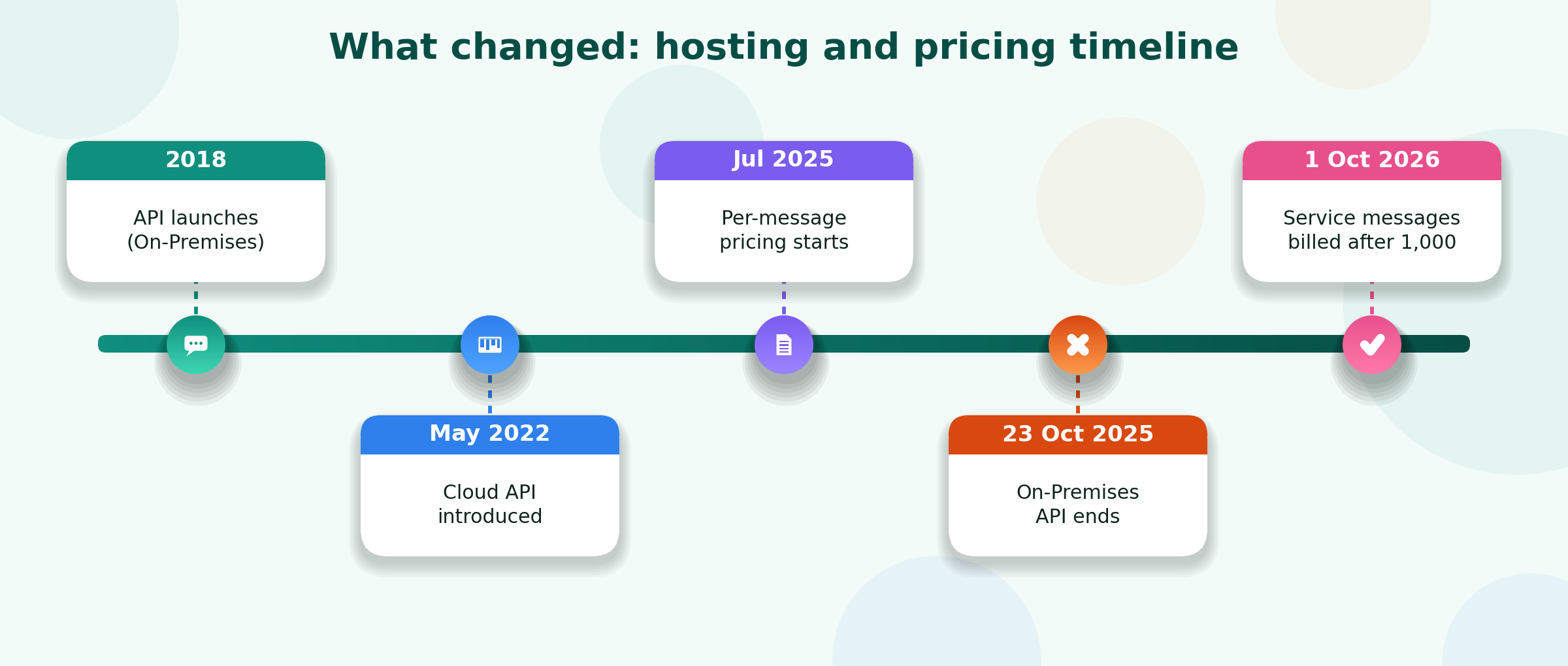
Figure 3: Key changes to hosting and pricing
What are WhatsApp messaging limits and quality ratings?
Sending is capped by a messaging tier. New numbers start at 1,000 unique customers per day, and limits rise while your quality rating stays healthy. Blocks and reports lower the rating (green, yellow, red). Message only opted-in users, and always offer a clear opt-out.
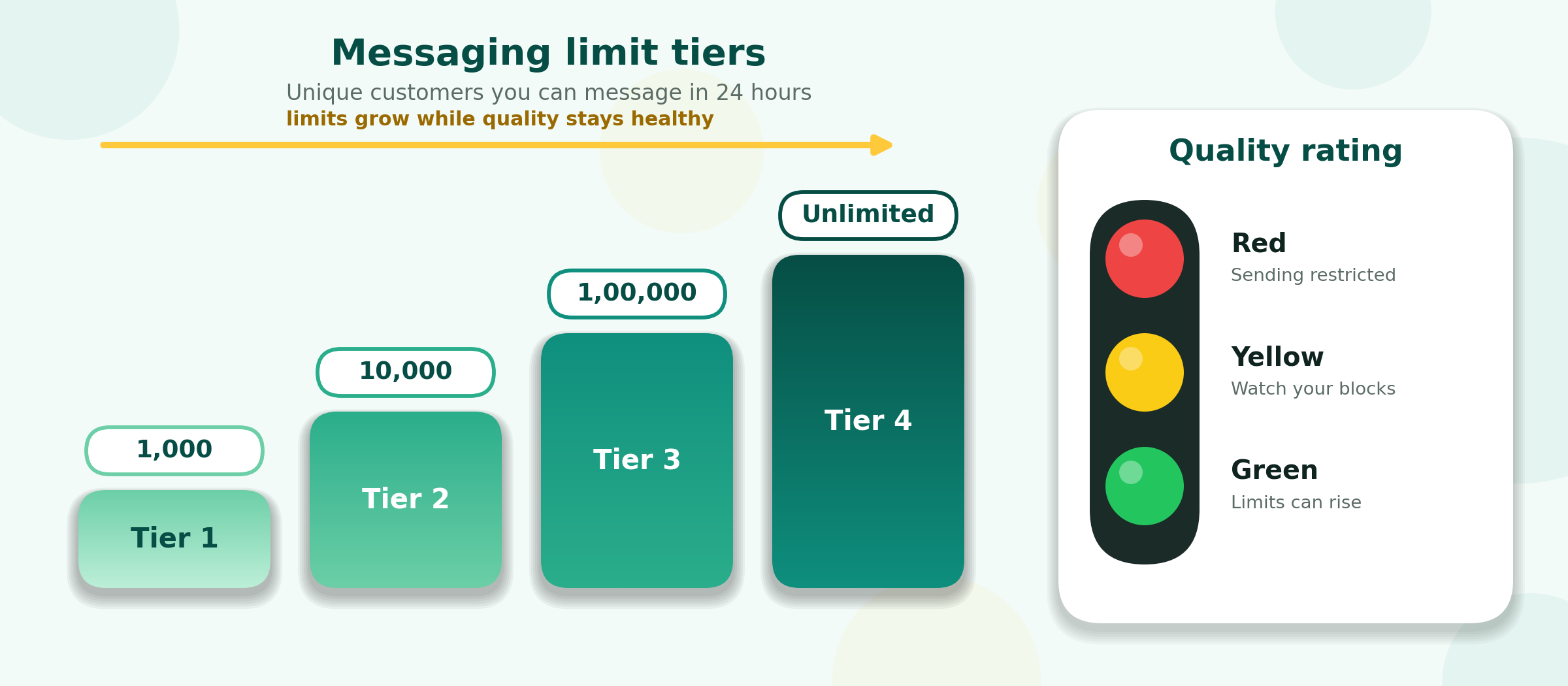
Figure 4: Messaging tiers and quality rating colours
How much does the WhatsApp Business API cost in India?
WhatsApp Business API pricing has two parts. First, Meta charges per delivered template message, by category and recipient country. Second, your provider charges a platform fee. Meta's India rates, on its rupee card effective 1 July 2026 and reported unchanged on 1 October 2026, are below.
| Message type (India) | Meta list rate | Typical use |
|---|---|---|
| Marketing | ₹0.8631 | Offers, launches, cart recovery |
| Utility | ₹0.1150 | Order, payment and delivery updates |
| Authentication | ₹0.1150 | OTPs and login codes |
| Service (customer-started chat) | 1,000 free per number each month, then ₹0.1150 | Support replies |
Utility and authentication prices fall at very high volumes. From 1 October 2026, service messages beyond the free 1,000 are billed at the utility rate. Add 18% GST, which providers usually apply on top.
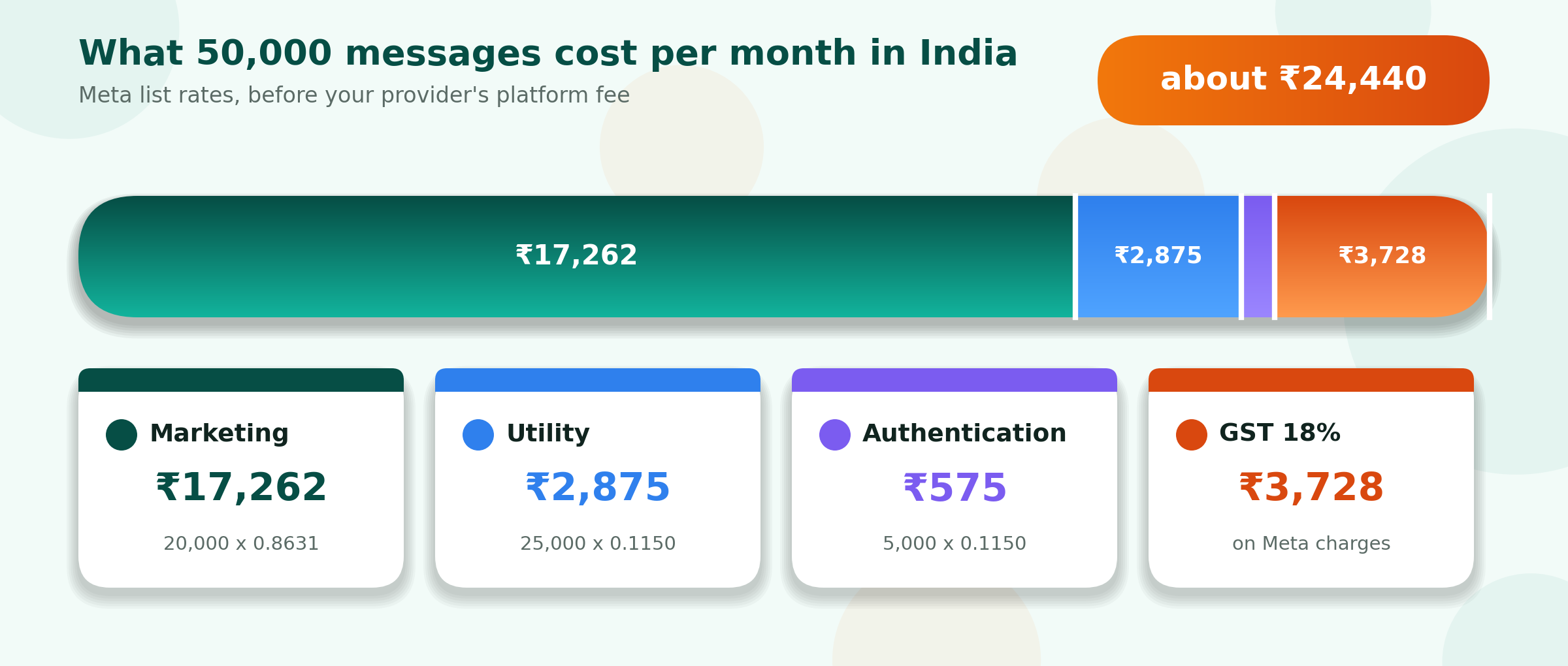
Figure 5: A worked example of a monthly Meta bill in India
Why do other sites show different numbers? Several Indian pages still quote ₹1.09 and ₹0.145, or ₹0.88 and ₹0.13. These differ from Meta's list rates, so ask your provider for an itemised invoice. For WhatsApp API pricing in India, provider plans start around ₹1,000 per month, and some charge setup fees, so compare total cost. The WhatsApp Business API cost is never fully free, though sign-up can be.
How to get WhatsApp Business API in India
Meta offers no ready dashboard, so most companies apply through a verified WhatsApp Business API provider. For WhatsApp business API registration, keep three things ready: a website showing your legal name, a number not used on any WhatsApp account (or one you will connect through coexistence), and a GST, MSME or incorporation document.
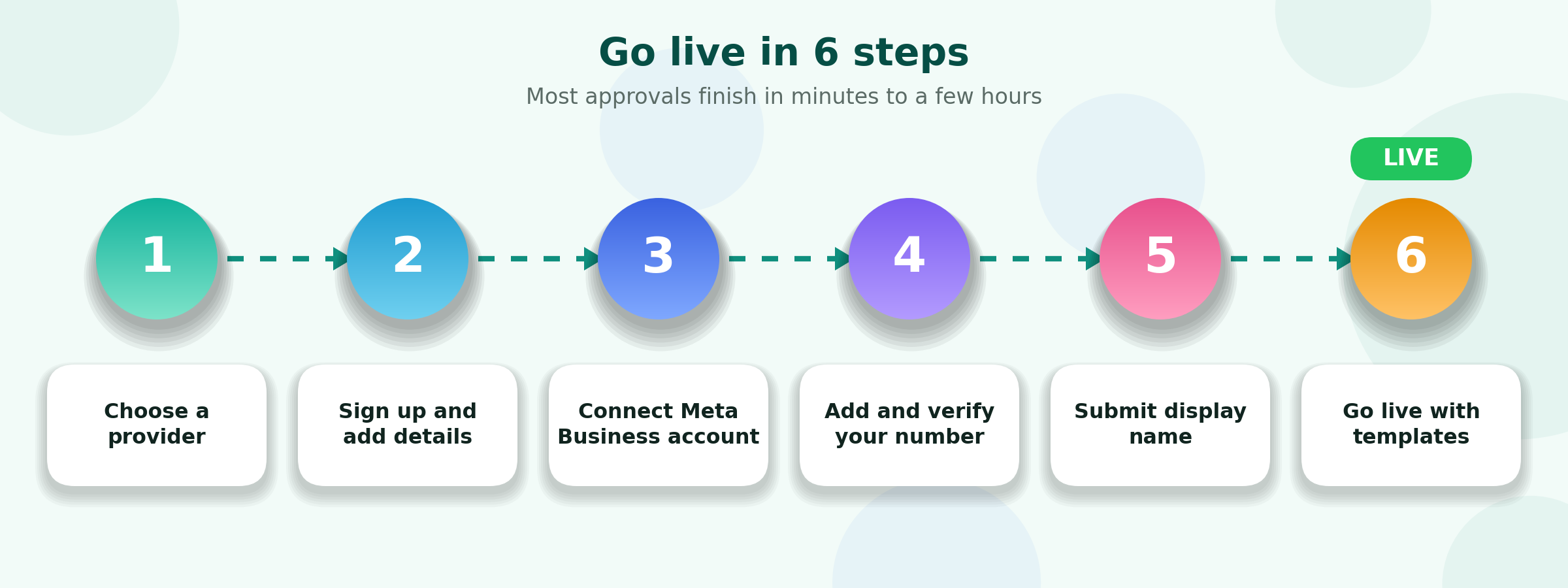
Figure 6: Six quick steps to go live
- Choose a provider and sign up with your business email.
- Add company details and click Continue with Facebook (admin access needed).
- Pick your Business Manager and create a WhatsApp Business profile.
- Add your display name and verify the number by SMS or call.
- Wait for review. Approvals often take minutes, display names a few hours.
Want the official tick? The WhatsApp Business API blue tick is a separate application, made once your brand is established.
What are the best WhatsApp Business API use cases?
These five industries use the API most in India, mainly for alerts, reminders and support.
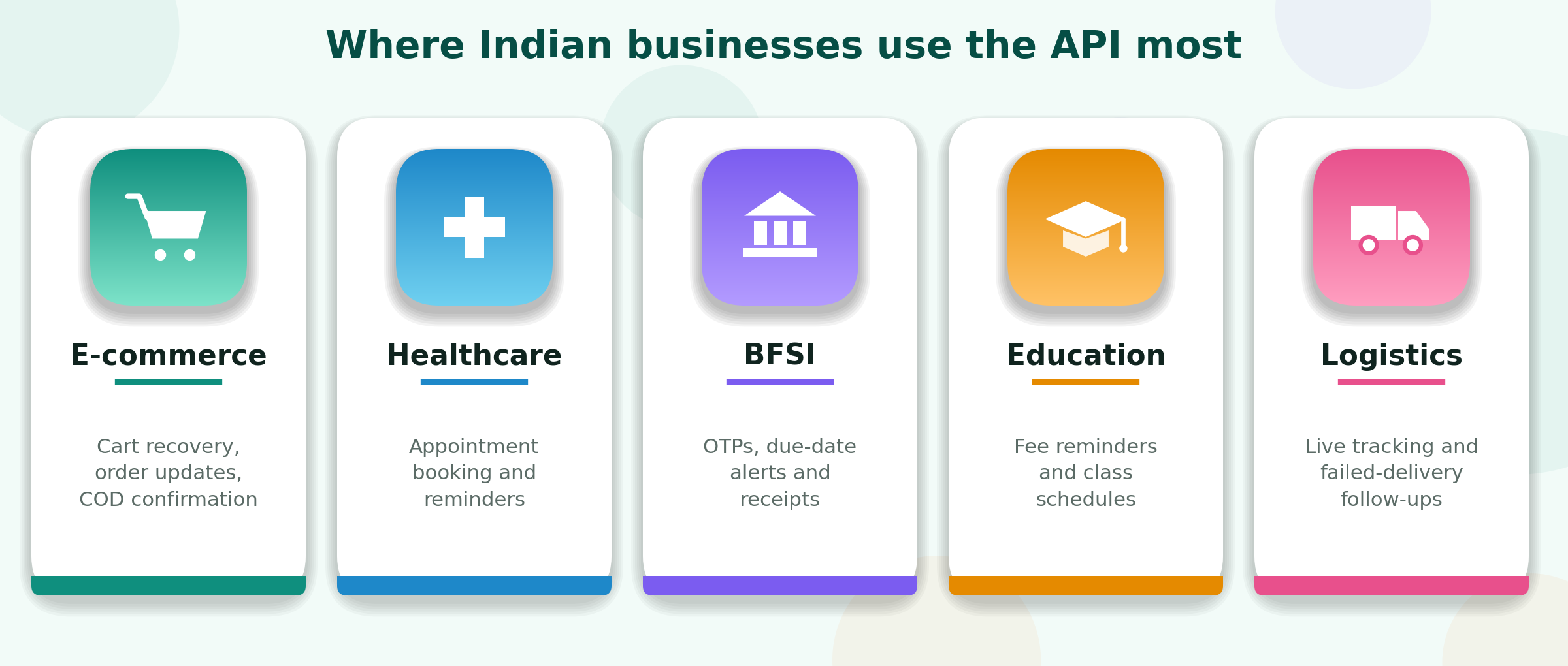
Figure 7: Popular use cases by industry
- E-commerce: abandoned cart nudges, order updates, COD confirmation.
- Healthcare: appointment booking and reminders.
- BFSI: OTPs, premium due alerts and receipts.
- Education: fee reminders and class updates.
- Logistics: live tracking and failed-delivery follow-ups.
With WhatsApp API integration into Shopify, HubSpot or Razorpay, these run automatically, even for a small business.
Do you need the WhatsApp Business API?
Yes, if you message hundreds of people regularly, need several agents on one number, want automation, or must sync WhatsApp with your store or CRM. If you reply to a few dozen chats a day alone, the free app is enough for now.
FAQs
What is the WhatsApp Business API?
It is Meta's official platform for businesses to message customers at scale on WhatsApp, with automation, chatbots and multiple agents, accessed through a provider.
Is the WhatsApp Business API free?
No. Meta charges per delivered template message, and providers charge a platform fee. Service replies are free for the first 1,000 per number each month.
How much does the WhatsApp API cost in India?
Meta charges ₹0.8631 per marketing message and ₹0.1150 per utility or authentication message, plus 18% GST and your provider's plan.
Can I use the app and the API on the same number?
Yes, through coexistence, which Meta has extended to India. Support depends on your provider, and broadcast lists become read-only in the app.
Is the On-Premises API still available?
No. Meta ended it on 23 October 2025. All numbers now use the Cloud API.
Can I run a chatbot on it?
Yes. A provider dashboard lets you build chatbots and automated flows without code.
Bottom line: start with a trusted provider, get templates approved, protect your quality rating, and grow tier by tier.
Sources: Meta for Developers, On-Premises API sunset; Meta WhatsApp Business Platform INR rate card, as reported by several providers; WhatsApp coexistence rollout notes (June 2026).